オプション
Overview
You can modify VocalSynth 2 configuration and preferences, check for updates and see your current authorization status in the Options dialog.
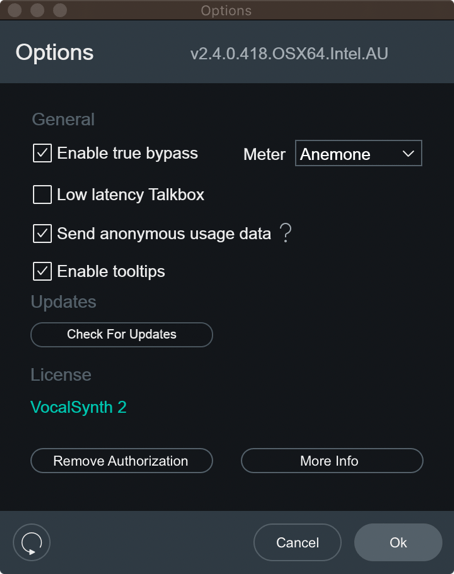
You can open the VocalSynth Options dialog by pressing the gear button on the right side of the plug-in header area.

The footer area of the Options dialog includes the following controls:

- Reset: Reverts all options to their factory default values.
- Ok: Saves changes and closes the Options dialog.
- Cancel: Closes the Options dialog without saving any recent changes.
General
- Enable True Bypass(トゥルー・バイパスのオン/オフ): モジュールを有効/無効(オン/オフ)する際、ノイズや 立上がりの待ち時間なく、滑らかな動作を確実にするため、DSP(デジタル・シグナル・プロセッサー)が常にバックグ ラウンドで動作しています。 Enable True Bypassは、あるモジュールやエフェクトを無効(オフ)にした時、その特定 のDSPも無効になるという意味です。そうすることでCPUに負担をかけず、レイテンシーの発生を防ぎます。一方で、 Enable True Bypassはパフォーマンスを最適化できますが、モジュールを有効/無効(オン/オフ)する時にノイズなどが 発生する場合があり、エフェクトあり/なしの聴き比べが難しくなる可能性があります。
- Low Latency Talkbox(Talkboxを低レイテンシーで使用する): VocalSynthのTalkboxは、ハードウェアを使う必要 なく、フォルマントのエンベロープなどの情報を正確に抽出して、入力オーディオ信号を分析することができます。明瞭 度にを求めるほどレイテンシーが発生しやすくなり、ライブパフォーマンスにおいては不安定になりがちです。そこで、 このパラメーターで2つアルゴリズムを切り替えます。ひとつはライブパフォーマンス用に最適化するもの。もうひとつ はスタジオ用(あるいは最後のバウンス用)です。スタジオ使用のためのアルゴリズムには、44.1 kHzのサンプルレート で約 50 msのレイテンシーがあります。偶然にもすべての周波数が通過する時間と大体一緒です。ちなみに 20 Hzの1サ イクルが 50 msです。(ヒトの耳の可聴域は 20-20000 Hz)
- Send Anonymous Usage Data(匿名の使用データを送信する): When enabled, anonymous usage data will be sent
to help iZotope improve VocalSynth and other products in the future.
- ?: Opens the iZotope Analytics Opt-in policy page in your web browser.
- Enable Tooltips(ツールチップを有効にする): 有効になっている時、カーソルをパラメーターに合わせると、説 明がツールチップに表示されます。
- Meter(メーター): VocalSynth 2 の中央に表示されるメーターを、以下の2種類から選択します。
- Anemone(アネモネ): VocalSynth 2の新しいヴィジュアライザー。有効になっているモジュールの動きを表示し ます。
- Wave(ウェイヴ): VocalSynth 1のウェイブメーターが表示されます。
Updates(アップデート)
The state of this button changes depending on if there is an available update, or if it is detected that you do not have iZotope’s Product Portal application installed.

- Download Product Portal: To stay up to date with new versions of VocalSynth and other iZotope products, download the iZotope Product Portal application.
- Check for Updates: Manually check for available updates. Clicking this button will open the Product Portal application and check for updates.
- Download Update: If an update is available, a small pink dot will appear here and on the options gear button in the main plug-in interface. Clicking the ‘Download Update’ button in the options window will launch the Product Portal application and display the Updates page.
Authorization(オーソライズ)
現在のオーソライズ状況を表示します。また、VocalSynth のオーソライズやオーソライズの解除もできます。 VocalSynth のオーソライズについての詳細は、オーソライズのページをご覧ください。
- Current Authorization Status(現在のオーソリゼーション状態): 現在のVocalSynth 2ßのオーソリゼーションの 状態を表示します。
- Remove Authorization(オーソリゼーションの削除): 現在のオーソリゼーションを削除します。
- Information Button(?ボタン): iZotopeのオーソリゼーションに関するサポート・ページを開きます。 Authorization Support
VocalSynth 2.5.0