Contesting
- Contesting Basics: What Everyone Needs to Know
- Choosing a Contest to Enter
- How do I pick a contest?, The Contest Types
- Death and Resurrection
- My pony died in a contest! Can I bring them back? Why isn't my pony gaining levels after I brought them back?
- Running Your Own Contests
- Creating a Contest, Cloning a contest, Private or Public: What's the difference?
- Resetting & Remaxing
- Basic Tips and Vetting Precautions, Finding a Contest, Contest Sign Up
Contesting Basics: What Everyone Needs to Know
Basic Tips and Vetting Precautions
Contesting is the most efficient way to earn experience for your pony. A single contest can earn your pony hundreds or thousands of experience points ("XP"). It would take dozens, if not hundreds, of people viewing your pony (unique "clicks") to earn the same amount of XP for your pony with just clicks.
Before you start contesting, there are a few things that you should know.
- Ponies will risk getting hurt in every type of contest except for a lottery. (Lotteries incur no damage for a pony.) Since a pony can incur up to 8 points of damage per contest, you should only ever enter your pony into ONE contest class per hour if you don't want to risk them dying.
- If you prefer to sign up for several hours worth of contests in advance, make sure that you're online at about 15 minutes after the hour to vet your ponies before their next contest. At 15 minutes after the hour, you can be assured that the tick should be over, all contests have run and damage has been calculated.
- If you are prone to internet or power outages--and even if you aren't!--the safest method of contesting is to enter the next contest after vetting for the previous and verifying that your vetting command was received by the server.
- When taking your pony to the vet, please remember that it is your responsibility as a player to make sure that the vetting goes through. There are a number of reasons outside of PI's control for why the vetting may not go through.
- Always make sure you let the page refresh completely before you go to another page, click a link or do something else. Not allowing the page to reload completely could cause the command to be aborted before it reaches the server.
To verify that the command has reached the server:
- Ctrl+F5 to refresh the page from the server and make sure the "V" is gone from the ponies.
- Keep an eye on your PG total at the top of the page, if your PG goes down you can be sure the vetting went through and that you're not viewing a cached page.
- Check your Finances History or Account Overview. Checking your finances is the best way to ensure that the vetting went through, as if it did not, there will be no transaction record in the history.
Finding a Contest
Now that we've covered the important parts of vetting and how to do your best to not over-contest your pony, let's see how to find and enter a contest.
You can find contests to enter in three places.
- The Next Contests page will show you all of the contests running the next hour that are open to the public. These are automatically sorted by the time that the contest was created, with the newest contests first.
- The Contests tab of the Search will allow you to search for specific types of contests, or contests that take place some time in the future. Contests that users have flagged as "Private" for their own use will show up here, so please take care to check any notes in the descriptions when using the Search to find a contest to enter.
- Sometimes users will also advertise their contests in the Contests Forum. Usually you will find contests with prizes at stake here.
Contest Sign Up
Once you've found a contest that you want to enter, click on the contest name (or the link if you found the contest advertised in a forum post) to go to the contest page.
You can enter your pony in a contest by either finding the appropriate class for your pony and choosing their name from the "Sign Up" dropdown box [Insert screenshot - Left or right] or by scrolling to the bottom of the contest page and selecting the ponies that you want to enter for the class in the mass sign up section.
When using the Mass Sign up, you can select groups of ponies to sign up into one class either by clicking the first name then scrolling down to the last pony (if the ponies are grouped together) and holding down the Shift key as you click the last pony in the group or by holding down the Ctrl key and clicking each pony individually.
Once you have picked the ponies that you want to enter, click the "Mass Sign Up" button underneath the boxes. If you have enough PG for the total entry fee, all selected ponies will be entered.
Choosing a Contest to Enter
How do I pick a contest?
What contest you choose to enter is completely up to you, but there are some factors that you will want to consider when choosing your contest.
Your pony's XP gain is primarily dependent on three things: The average level of the class, the number of ponies in the class, and your pony's placement in the final outcome. The more ponies in the class and the closer your pony is to the average level of the class, the more XP they will gain for a similar placement.
Or in other words, a pony that places first in a class of 110 will earn more XP than a pony that places first in a class of 30. A pony that is close to or above the average level will gain more XP for a similar placing than a pony whose level is significantly below the average level (less than 50% of the average).
Your pony's placement in a class is dependent upon their stats plus a random factor. A pony with a higher stat but lower level could beat a pony with a higher level and lower stat. Items will also factor into the final placement, as they effectively "add" levels with their attribute bonuses.
What stats are counted for each type of contest is explained in further detail below. For now, let's look at the contest numbers themselves and see how to interpret them.
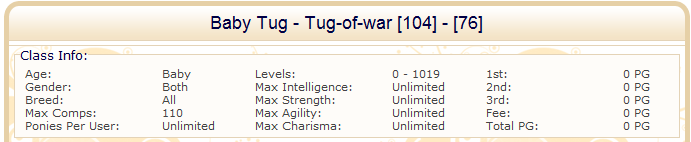
1) This tells us four things:
Contest Name - Contest Type [# of Ponies] - [Average level of all ponies]
The contest name is the name that the owner of the arena entered when they created the contest. It could be something descriptive or simple.
The contest type is the type of contest (see below).
# of ponies shows how many ponies are in the class.
Average level of all ponies shows the average level of all of the ponies in the class. This is important to the calculations for XP.
2) The Class Info box has all of the useful information about the class itself.
Age - Adult or Baby
Gender - Male only, Female only, or Both
Breed - Is it limited to a specific breed (beyond what the class limitations may be) or open to all ponies.
Max Comps - The capacity of the class or how many ponies can enter the class at once.
Ponies Per User - How many ponies can be entered from a single account.
Levels - The level range of ponies that can enter
Max Intelligence/Strength/Agility/Charisma - Are there limits placed on certain stats? This may be used for someone using a specific type of contest that wants to make sure that the important stats are kept within a certain range.
1st/2nd/3rd - The payout for taking one of these places if there is an entry fee and the organizer shares the profit.
Fee - The entry fee for the class
Total PG - The total amount of PG available for prizes (again, only if there is an entry fee and the organizer shares the profit.
The Contest Types
The different types of contests use different attributes when determining a pony's placing. Certain contests will also restrict you to entering only certain breeds by default. If you want to focus on training a pony that has a high charisma stat, you might want to seek out Beauty contests, or if you wanted to limit your contest to a certain "type" of breed, you would want to make sure that you chose a contest that only breeds of that element could enter. Air, Earth, Fire and Water Air/Earth/Fire Air Earth Water Fire
Beauty Contest
[IN: 0% | ST: 0% | AG: 0% | CH: 100%]
Breeds that can enter: AllMarathon
[IN: 25% | ST: 25% | AG: 25% | CH: 25%]
Breeds that can enter: All Tug-of-war
[IN: 0% | ST: 100% | AG: 0% | CH: 0%]
Breeds that can enter: All Lottery
[IN: 0% | ST: 0% | AG: 0% | CH: 0%]
Breeds that can enter: AllHide and Seek
[IN:60% | ST: 10% | AG: 30% | CH: 0%]
Breeds that can enter: All Air-Earth Marathon
[IN: 25% | ST: 25% | AG: 25% | CH: 25%]
Breeds that can enter: Breeds that can enter: Earth ponies, Dragon ponies, Fairy ponies, Flutter ponies, Kirin ponies, Pegasus ponies, Phoenix ponies, Purr ponies, Reindeer ponies, Unicorns, Valkyries, Winged Unicorns, and Wishing poniesSpeed Flying
[IN: 0% | ST: 70% | AG: 30% | CH: 0%]
Breeds that can enter: Dragon ponies, Fairy ponies, Flutter ponies, Pegasus ponies, Phoenix ponies, Winged Unicorns, and Wishing poniesAir Ballet
[IN: 10% | ST: 10% | AG: 40% | CH: 40%]
Breeds that can enter: Dragon ponies, Fairy ponies, Flutter ponies, Pegasus ponies, Phoenix ponies, Winged Unicorns, and Wishing poniesSlalom Flying
[IN: 10% | ST: 40% | AG: 50% | CH: 0%]
Breeds that can enter: Dragon ponies, Fairy ponies, Flutter ponies, Pegasus ponies, Phoenix ponies, Winged Unicorns, and Wishing poniesRacing
[IN: 0% | ST: 70% | AG: 30% | CH: 0%]
Breeds that can enter: Earth ponies, Kirin ponies, Purr ponies, Reindeer ponies and Unicorns Show Jumping
[IN: 30% | ST: 30% | AG: 40% | CH: 0%]
Breeds that can enter: Earth ponies, Kirin ponies, Purr ponies, Reindeer ponies and Unicorns Slalom Racing
[IN: 10% | ST: 40% | AG: 50% | CH: 0%]
Breeds that can enter: Earth ponies, Kirin ponies, Purr ponies, Reindeer ponies and Unicorns Swimming
[IN: 0% | ST: 50% | AG: 50% | CH: 0%]
Breeds that can enter: Sea ponies, Shell ponies, Mer Ponies, and MerDragonsWater Ballet
[IN: 10% | ST: 10% | AG: 40% | CH: 40%]
Breeds that can enter: Sea ponies, Shell ponies, Mer Ponies, and MerDragonsDiving
[IN: 0% | ST: 0% | AG: 80% | CH: 20%]
Breeds that can enter: Sea ponies, Shell ponies, Mer Ponies, and MerDragonsLava Walking
[IN: 20% | ST: 0% | AG: 80% | CH: 0%]
Breeds that can enter: Dragon ponies, Phoenix ponies, and Valkyrie ponies
Death and Resurrection
My pony died in a contest! Can I bring them back?
You certainly can--with an item known as a Scroll of Resurrection. These scrolls will allow you to resurrect any pony that died on your account, and only your account. You cannot bring back a pony that died on someone else's account, on a Trial user's account or that died in the Trial market, or on a Trial user's account that has been deleted from the system.
There are three types of Scrolls.
Scroll of Resurrection -
These are the basic scrolls that can be generated with 10 BP once your generator BP level is 100 or more. They will resurrect your pony with a 10% loss of the pony's total experience points.
Scroll of Resurrection - Silver -
These scrolls are handed out for special events or prizes and cannot be generated. They will bring back a pony with only a 5% loss of the pony's total experience points.
Scroll of Resurrection - Golden -
These scrolls are also handed out for special events or prizes. They will bring a pony back with no experience loss.
Why isn't my pony gaining levels after I brought them back?
Probably because the XP loss that was caused by resurrecting them put them into what's known as negative XP. Negative XP means that they've lost so much XP that it should have knocked them down a level (or ten!), but because you don't actually lose levels, they just have to earn enough XP to get back to where they were before dying.
Let's take a pony of level 526 with XP of 13,849,759. If they were to die and be resurrected with a basic scroll, they would lose 1,384,976 XP to put them back at 12,464,783 XP. That's the equivalent of knocking that pony back to level 499--27 levels! They won't actually lose the levels, but they will have to regain the XP before they can start leveling again.
Running Your Own Contests
Creating a Contest
To create your own contest you'll first have to save up for [Insert link to Islands/#Arenas]an Arena. When you've bought an Arena a new tab will appear in your "Contests" page that is now named for your arena. On that tab, you will find a section titled "Organize Contest". Here you can create your very own contest!
First, choose a name for your contest. Next, choose when you want the contest to run. You can make a contest up to 30 days in advance.
Next choose your Profit. "Profit" is how much of the collected entry fees for the class will go to you at the end of the contest. When you choose anything less than 100%, the remainder of the amount becomes the prize pot that will go to the owners of the ponies that place first, second, and third. The winner of the class gets 50% of the prize pot, the second gets 30% and the third gets 20%.
You can also write a short description of your contest, to tell other users what kind of contests you are running, or anything special about it.
You can change the description later on if you add more classes or see a spelling error by going back to this page and choosing the desired contest in the "--=[Organize Contest]=--" drop down. Once you make your changes, click the update button to save them.
Additionally, you can choose the prizes you want to give the winner.
Prize pictures should be 70x100 pixels, in .gif format, and less than 20k file size. If pictures are in any other format they won't work. Nor can you have pictures bigger then 20k each. You are only allowed to use your own graphics for prizes, unless you have another artist's written permission to use their art.
Now that you've created your contest, you must choose what classes you want to run. Adult classes cost 1600PG to create and baby classes cost 800Pg to create.
From the Arena page, click the contest you wish to add classes to.
First you name the class in the "Class Name" field, and then you choose the fee for the contest. The fee is how much it'll cost to sign up a pony for the class.
Then choose what type of competition you want. To see what attributes are used in what contests and which breeds that can enter a certain competition, refer to the list above.
Then you choose the amount of competitors you'd like to allow in your contest if you don't want to fill up your arena of some reason.
Ponies per user are how many ponies each player will be able to sign up with in this class.
Now you can choose a specific breed if you want one, like if you want a flutter pony only beauty contest, you'll have to choose flutter as your specific breed.
Then you choose what age group the contest is for, adults or babies.
Then you can choose if you want both genders to be able to compete or if this one is for males/females only.
Then you can choose to limit how high each of the ponies' attributes may be or if you want to limit entries by level, you choose maximum and/or minimum level of the ponies.
Now take a look to make sure that everything is correct and click "Add Class". Once you add the class, you will not be able to change anything about it, so make sure that everything is right before you click!
Cloning a contest
You can clone a contest in your arena that has not run yet, or one of the last five contests that ran. This makes it much easier to set up the same contest repeatedly.
To clone a contest, first select the contest from the "--=[Organize Contest]=--" drop down menu on your arena page as if you were going to edit the description or prizes.
Next choose the date and time that you want the new contest to run and Click "Clone". You will be asked to input a name for the new contest. Once you do, it will appear on your contest list above.
You cannot make edits to your contest before you clone it if the previous contest has already run. You will need to first clone the new contest, and then go in to make your edits.
Private or Public: What's the difference?
Public contests will show up on the Next Contests page. Anyone looking for contests that will run at the next tick will be able to find your contest advertised here and enter.
Contests that are set as Private will not show up on the Next Contests page but can still be found through the search or through your arena page. Because of this, if you need all of the spaces, it is a good idea to make sure that you note that it is a private contest in the description or the title.
I want to open my contest to the public now that I've entered. How do I switch?
Select the contest from the "--=[Organize Contest]=--" drop down menu on your arena page as if you were going to edit the description or clone the contest. Change "Private: Yes" to "Private: No", then click update. Your contest will now appear on the Next Contests page.
Resetting & Remaxing
Once your pony has "maxed out", or has reached the maximum possible level of 1020, an option to "reset" the pony to level 0 will appear in the pony's profile.
If you choose to reset your pony, it will gain a colored star in it's profile to show that it has maxed out and then been reset. The pony will also be awarded a piece of armor. You'll get to chose which piece of the armor you want during the reset process.
A full set of armor is 4 pieces on the pony which are divided into the following:
Chanfron & Crinet - - Protects Head & Neck
Flanchard & Peytral - - Protects the Flank & Chest
Croupiere - - Protects the Back
Greaves - - Protect the legs
Freaves - - Protect the fins
A pony that has maxed out 1 time can wear the Silver armor. While a pony that has maxed out 2 times can wear the Gold armor, and so on and so forth. With every reset a pony achieves, new armor will become available.
When you have reset the pony, it will appear to be a normal level 0 pony with the ability to wear the special armor you received when you reset it. Do not be fooled, reset ponies will earn XP at a slower rate than they had before. With each reset the XP gets divided by the reset time plus 1 so the second time you reset you get:
XP / (2+1)
When you've maxed out one time, the next time it'll take twice as much time to max out and so on and so forth.
A record of each reset will be added to your quest page as an achievement.