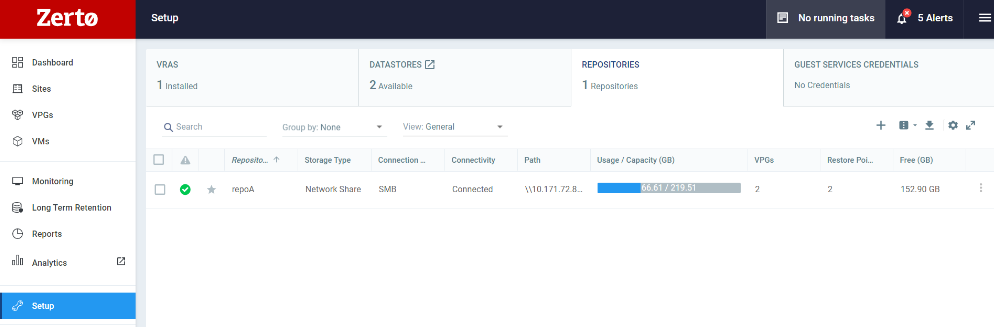
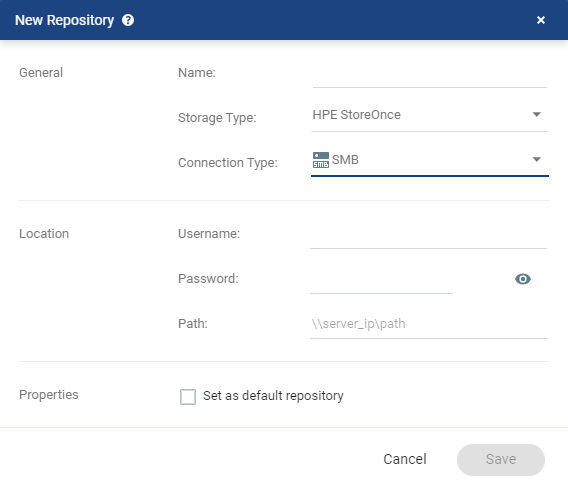
New Repository Dialog
To edit a repository, see Edit Repository Dialog.
The data is saved in a Repository for a defined Retention period. Each VPG has Retention sets created according to a schedule. The Retention sets are fixed points saved either daily, weekly, monthly, or yearly in the Repository, with a pre-defined expiration date.
As the Retention process runs on the recovery site, the Repositories are connected to the recovery ZVMs. Zerto can connect to these repositories using NFS, SMB (CIFS) protocols or HPE StoreOnce Catalyst API, where the underlying storage can be either standard storage appliances (NAS storage systems), or Purposely Built Backup Appliances (PBBAs) such as ExaGrid, Data Domain or HPE StoreOnce.
The Data Streaming Service (DSS) entity performs all the data copy operations. During the Retention process, the DSS communicates with the VRA on the recovery site.
Before you can start a Retention process for VPGs, you must first create one or more Repositories that will be used as a target for the Retention sets..
The Repository can be an empty share or a non-empty repository with existing content. When a non-empty repository is connected to the ZVM, all its valid Retention sets will be synced and become available for Restore. Only successfully completed Retention processes result in valid Retentions sets.
After the repository has been created and configured, it can be selected as a target in the VPG retention policy configuration.
Once the repository has been configured, it can be selected as a target in the VPG retention policy configuration.
You can edit or delete an existing repository:
Before you begin
Before creating the repository, review the following:
|
•
|
The minimum supported network speed between the VRA and the LTR repository is 10MB/s. |
|
•
|
When using Long-term Retention, make sure the VRA is configured with 2 vCPUs. |
HPE StoreOnce Catalyst Considerations:
|
•
|
The Catalyst Store on the HPE StoreOnce appliance must support LBW as the “Transfer policy”. Catalyst API server version should be v9 and above. |
|
•
|
The Catalyst Store on the HPE StoreOnce appliance must allow access to the recovery VRA. The default setting is No Access. A user with Administrator Role can enable access through the Catalyst User Interface. |
|
•
|
The Catalyst Store on the HPE StoreOnce appliance must have credentials already defined. These credential are used when setting up the Repository in the Zerto User Interface. |
|
•
|
The HPE StoreOnce Catalyst repository requires increasing the VRAs RAM to 4GB. 1GB will be allocated for Catalyst usage. |
|
•
|
The Catalyst Store on the HPE StoreOnce appliance must have "Logical Storage Quota" defined. |
To create a repository for Long-term Retention:
|
1.
|
In the Zerto User Interface, click SETUP > REPOSITORIES > NEW REPOSITORY. |
The New Repository window is displayed.
| Name:
|
A unique name for the repository. |
| Storage Type:
|
|
Network share
|
To connect to an AWS Storage Gateway Repository, select this option. See Using AWS Storage Gateway Repository.
|
| Other De-Duplicating Storage Appliances |
Standard
storage appliance |
| Purposely Built Backup Appliances (PBBAs): |
|
|
| Connection Type:
|
| NFS |
The network share is connected on top of NFS protocol. Select NFS for AWS Storage Gateway. |
| SMB |
The network share is connected on top of SMB (CIFS) protocol. Username and password must be provided to access the share.
Username: The username can be entered using either of the following formats:
Password: Password to access the network share.
|
| HPE StoreOnce
Catalyst |
Username: The username can be entered using either of the following formats: Password: Password to access the Catalyst store. Catalyst Server: IP of the HPE StoreOnce appliance that holds the Catalyst store. Catalyst store name: The Catalyst store name in HPE StoreOnce appliance. |
|
| Path
|
This is the path where the Repository will reside. This field does not apply to HPE StoreOnce Catalyst connection type. Zerto recommends using an empty folder when creating a new Repository.
The path must be accessible from the VRA, so if the Repository is on a different domain, the domain must be included in the path.
|
|
•
|
In the Properties area: |
| Set as default repository
|
Select this checkbox to use the Repository as the default when defining the Retention policy in a VPG. |
|
3.
|
Click SAVE. The repository is created. |
You can now enable Long-term Retention.
See also: