Add Checkpoint Dialog
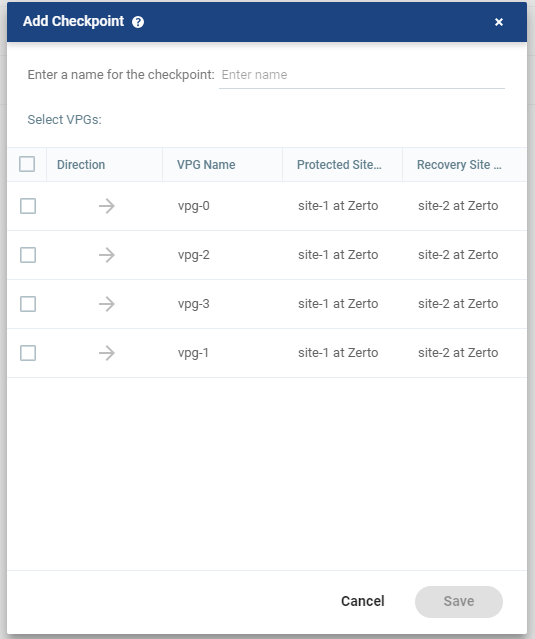
Checkpoints are recorded automatically every few seconds in the journal. These checkpoints ensure crash-consistency and are written to the virtual machine journals by the Zerto Virtual Manager. Each checkpoint has a timestamp set by the Zerto Virtual Manager. In addition to the automatically generated checkpoints, you can manually add checkpoints to identify events that might influence the recovery, such as a planned switch over to a secondary generator.
The list of VPGs is displayed. You can select more VPGs to add the same checkpoint.
| • | Enter a name for the checkpoint: The name to assign to the checkpoint. |
| • | Direction: The direction of the protection. |
| • | VPG Name: The name of the VPG. |
| • | Protected Site Name: The name of the site where virtual machines are protected. |
| • | Recovery Site Name: The name of the site where protected virtual machines are recovered. |
You can filter columns in the list via the filter icon next to each column title. You can also sort the list by each column. Clicking the cog on the right side of the table enables you to change the columns that are displayed and to create a permanent view of the columns you want displayed.
See also:
| • | About Dialog |
| • | Pair Sites - Add Site Dialog |
| • | Add Static Route Dialog |
| • | Advanced Journal Settings Dialog |
| • | Advanced Journal Settings Dialog (vCD) |
| • | Advanced VM Recovery Settings Dialog |
| • | Advanced VM Replication Settings Dialog |
| • | Advanced VM Replication Settings Dialog (vCD) |
| • | Advanced VM Settings for Cloud Dialog |
| • | ALERTS |
| • | Boot Order Dialog |
| • | Browse for File Dialog |
| • | Change Host Password VRA Dialog |
| • | Edit VM Recovery VRA Dialog |
| • | Checkpoints Dialog |
| • | Configure and Install VRA Dialog |
| • | Configure Paired Site Routing Dialog |
| • | Configure Provider vDCs Dialog |
| • | Configure VM Settings Dialog |
| • | Create New Credentials Dialog |
| • | Edit Volume Dialog (vCD) |
| • | Edit NIC Dialog |
| • | Edit Repository Dialog |
| • | Edit Selected Volumes Dialog |
| • | Edit VM Dialog |
| • | Edit VM Dialog (vCD) |
| • | Edit VM Settings Dialog (AWS) |
| • | Edit VM Settings Dialog (Azure) |
| • | Edit vNIC Dialog |
| • | Edit vNIC Dialog (vCD) |
| • | Edit Volumes Dialog |
| • | Edit Volumes Dialog (vCD) |
| • | Edit VRA Dialog |
| • | Guest Services Settings Dialog |
| • | License Dialog |
| • | Manage Static Routes Dialog |
| • | New Repository Dialog |
| • | Restore - Edit NICs Dialog |
| • | Offsite Clone Window |
| • | Open Support Case Dialog |
| • | Remote Support Dialog |
| • | Restore a Virtual Machine or VPG from Repositories |
| • | Restore - Edit Volumes Dialog |
| • | Restore - Edit Selected Volumes Dialog |
| • | Site Settings Dialog |
| • | Stop Failover Test Dialog |
| • | TASKS |