Advanced VM Replication Settings Dialog
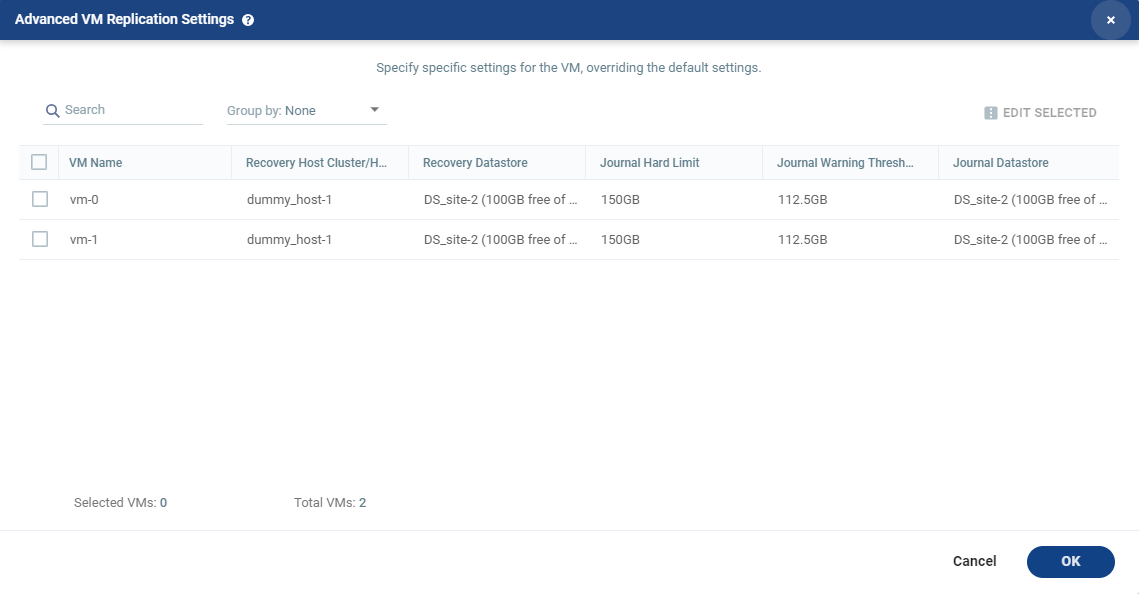
Displays the replication settings for the virtual machines in the VPG. You can choose to edit information in one field by clicking the field and updating the information. You can choose to edit information for several virtual machines at the same time by selecting the virtual machines and clicking EDIT SELECTED.
For more details, Edit VM Dialog.
See also:
| • | About Dialog |
| • | Add Checkpoint Dialog |
| • | Pair Sites - Add Site Dialog |
| • | Add Static Route Dialog |
| • | Advanced Journal Settings Dialog |
| • | Advanced Journal Settings Dialog (vCD) |
| • | Advanced VM Recovery Settings Dialog |
| • | Advanced VM Replication Settings Dialog (vCD) |
| • | Advanced VM Settings for Cloud Dialog |
| • | ALERTS |
| • | Boot Order Dialog |
| • | Browse for File Dialog |
| • | Change Host Password VRA Dialog |
| • | Edit VM Recovery VRA Dialog |
| • | Checkpoints Dialog |
| • | Configure and Install VRA Dialog |
| • | Configure Paired Site Routing Dialog |
| • | Configure Provider vDCs Dialog |
| • | Configure VM Settings Dialog |
| • | Create New Credentials Dialog |
| • | Edit Volume Dialog (vCD) |
| • | Edit NIC Dialog |
| • | Edit Repository Dialog |
| • | Edit Selected Volumes Dialog |
| • | Edit VM Dialog |
| • | Edit VM Dialog (vCD) |
| • | Edit VM Settings Dialog (AWS) |
| • | Edit VM Settings Dialog (Azure) |
| • | Edit vNIC Dialog |
| • | Edit vNIC Dialog (vCD) |
| • | Edit Volumes Dialog |
| • | Edit Volumes Dialog (vCD) |
| • | Edit VRA Dialog |
| • | Guest Services Settings Dialog |
| • | License Dialog |
| • | Manage Static Routes Dialog |
| • | New Repository Dialog |
| • | Restore - Edit NICs Dialog |
| • | Offsite Clone Window |
| • | Open Support Case Dialog |
| • | Remote Support Dialog |
| • | Restore a Virtual Machine or VPG from Repositories |
| • | Restore - Edit Volumes Dialog |
| • | Restore - Edit Selected Volumes Dialog |
| • | Site Settings Dialog |
| • | Stop Failover Test Dialog |
| • | TASKS |