Advanced VM Replication Settings Dialog (vCD)
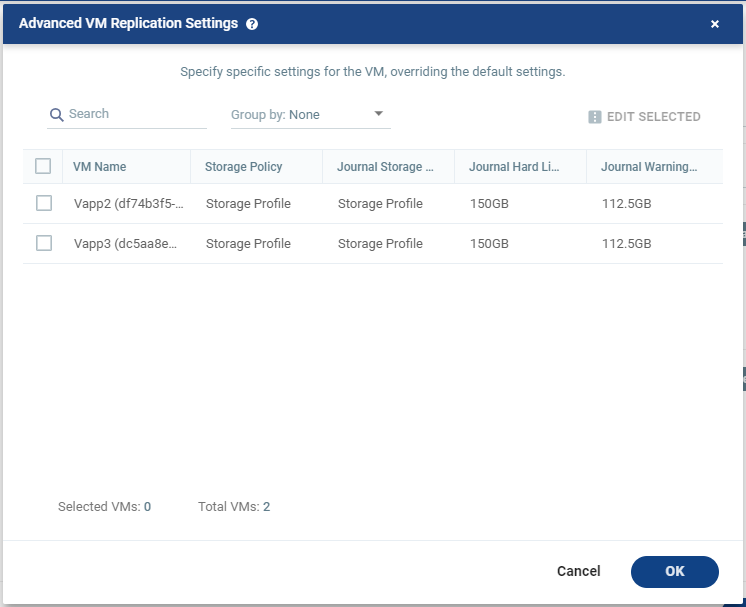
Appears only in environments with vCD.
Displays the settings of the virtual machines in the VPG.
To edit information for a single VM, click the field Storage Policy, and/or Journal Storage Policy, and update the information.
|
1.
|
When selecting a Storage Policy, consider the following: |
|
•
|
Zerto will select a datastore from the selected Storage Policy in which to place these files, unless the datastore is excluded in the Configure Provider vDCs Dialog. |
|
•
|
Zerto will try to determine a default Storage Policy according to: |
|
•
|
A Storage Policy with the same name as the protected Storage Policy. |
|
•
|
The default Orgvdc Storage Policy. |
If Zerto did not manage to determine a default Storage Policy, this field appears empty.
|
•
|
When you click to edit, a list of Storage Policies appear. These Storage Policies: |
|
•
|
Were defined in VMware vCloud Director and are configured in the Orgvdc. |
|
•
|
Have at least one Datastore that was not excluded as a Recovery Volume in the Configure Provider vDCs Dialog. |
|
2.
|
When selecting a Journal Storage Policy, consider the following: |
|
•
|
Zerto will select a datastore from the selected Storage Policy in which to place the Journal files, unless the datastore is excluded in the Configure Provider vDCs Dialog. |
|
•
|
The default Journal Storage Policy is the same as the default VM Storage Policy. |
|
•
|
If Zerto did not manage to determine a default Journal Storage Policy, this field appears empty. |
|
•
|
When you click to edit, the option Auto Select appears, and a list of Storage Policies. |
|
•
|
The list of Storage Policies associated with the Journal: |
|
•
|
Were defined in VMware vCloud Director and are configured in the Orgvdc. |
|
•
|
Have at least one Datastore that was not excluded as a Journal in the Configure Provider vDCs Dialog. |
|
•
|
Auto Select: Selecting this means that the journal can be placed in any datastore visible to the host that Zerto selected for recovery, unless the datastore is excluded in the Configure Provider vDCs Dialog. |
For more details, Edit VM Dialog (vCD).
See also: