Edit VRA Dialog
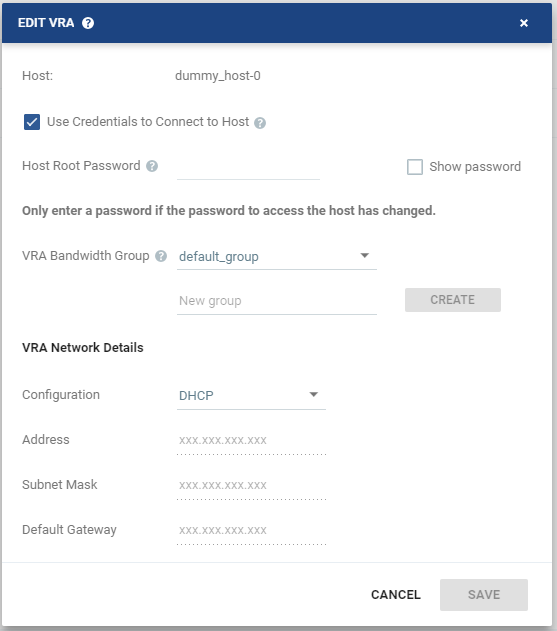
To change the network settings for a VRA, for example when the gateway to the VRA is changed.
|
•
|
Host: The IP of the host on which the VRA is installed. |
For ESXi 5.5 and later hosts, by default, Zerto Virtual Manager uses a vSphere Installation Bundle, VIB, to connect to the host. When using VIB:
|
•
|
The user does not enter a password. |
|
•
|
Once a day, Zerto Virtual Manager checks that the VRA and host can connect. If the connection fails, Zerto Virtual Manager re-initiates the connection automatically and notes this in the log. |
When using a password, root access is required if the Zerto host component is down and needs an automatic restart. Once a day, Zerto Virtual Manager checks that the password is valid. If the password was changed, an alert is triggered, requesting the user enter the new password.
|
•
|
(vSphere only) Use credentials to connect to host: When unchecked, the Zerto Virtual Manager uses VIB to connect to the host. This field is only relevant for ESXi 5.5 and later. |
|
•
|
(vSphere only) Host Root Password: When the VRA should connect to the host with a password, select Use credential to connect to host, then enter the root user password used to access the host. When the box on the right side is selected, the password is displayed in plain text. This field is only relevant for ESXi 4.x and 5.x hosts. This field is disabled for ESX 4.x hosts. |
|
•
|
VRA Bandwidth Group: The free text to identify the group to which a VRA belongs. If you create a group and then change the name when editing the VRA so that there is no VRA in the site that belongs to the originally specified group, the group is automatically deleted from the system. |
To create a new group, enter the new group name over the text New group and click CREATE.
|
•
|
Configuration: Either have the IP address allocated via a static IP address or a DHCP server. If the VRA was originally installed with a static IP, you cannot change this to DHCP. If the VRA was originally installed to use a DHCP server, you can change this to use a static IP. |
|
•
|
Address: The static IP address for the VRA to communicate with the Zerto Virtual Manager. |
|
•
|
Subnet Mask: The subnet mask for the network. The default value is 255.255.255.0. |
|
•
|
Default Gateway: The default gateway for the network. |
See also: