Edit VM Settings Dialog (Azure)
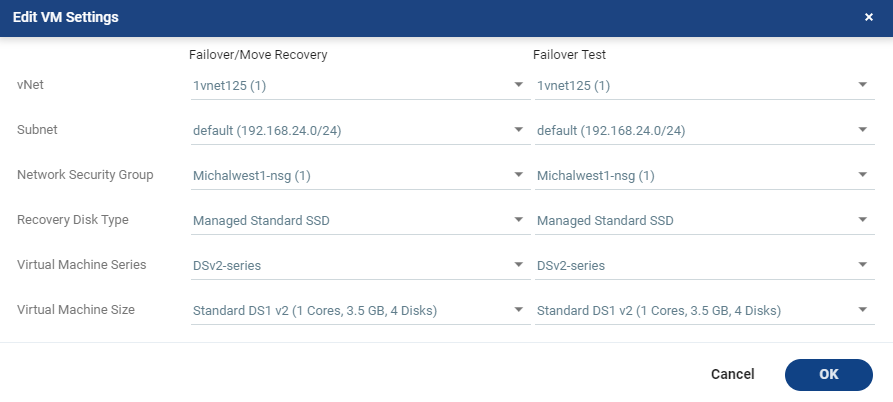
Edit the network settings for one or more virtual machines in a VPG that will be recovered to Azure. There are recovery settings for failovers and moves, and for failover tests.
|
•
|
VNet: A The virtual network dedicated to your Azure subscription. |
|
•
|
Subnet: A range of IP addresses in your VPC. |
|
•
|
Network Security Group: The Azure network security to be associated with the virtual machines in this VPG. You can associate one or more network security groups with the virtual machines. |
|
•
|
Recovery Disk Type: Select the Azure recovery storage type to which the selected virtual machines will be recovered to; Managed Premium SSD, Managed Standard SSD or Managed Standard HDD. The Virtual Machine Series and Virtual Machine Size fields are updated with the relevant options based on the selected Recovery Disk Type. |
|
•
|
Virtual Machine Series: The virtual machine series from which to select the size. Azure virtual machine series are optimized for different types of applications. The default is set to DSv2. You can choose the virtual machine series appropriate for the application being protected in the VPG. |
|
•
|
Virtual Machine Size: The virtual machine size, within the virtual machine series, to assign to recovered virtual machines. Different sizes within a virtual machine series vary, for example in a number of cores, RAM, and local storage size. The default is set to Standard_DS1_v2. You can choose the virtual machine size appropriate for the application being protected in the VPG. The price per virtual machine is related to the virtual machine configuration. |
See also: