
Update the Clean Power VFD software
SmartD can update the Clean Power VFD software. This will add new options and functions to the drive.
The software version in your drive can be read through the embedded HMI or using the SmartDrive App
Information about the version are accessible from the changelog database.
Software version⚓
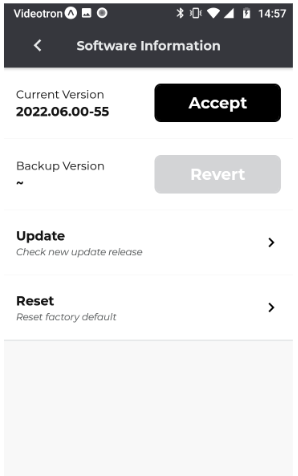
Go to the software Information from the Smartphone App menu :
(accessible by clicking on the ellipsis in the upper right corner)
Select Update
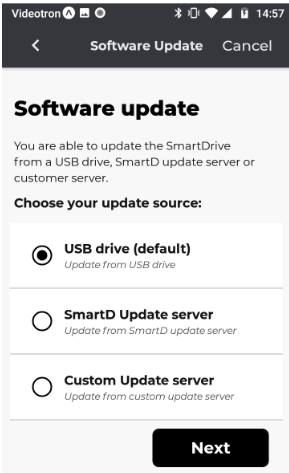
Select from "SmartD Update server"
Note : you need your Smartphone connected to the internet to perform this operation.
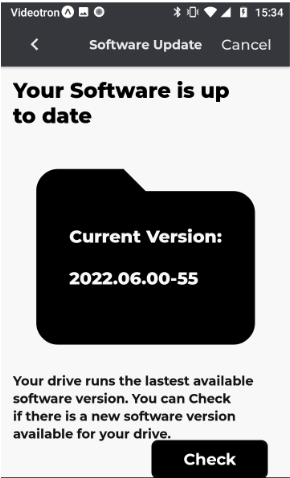
It is displaying either that your version is OK or it will tell you that a new version is available.
Step by step operation to update/upgrade the Clean Power VFD software⚓
The software update is performed by pulling all the files from a distant server or a USB drive, and installing them on the backup bank of the Clean Power VFD.
This means that the user do not need to stop the motor or any other process currently running on the boot bank.
Once the installation is complete, the user needs to reboot the Clean Power VFD for the update to be effective.
ProcedureHow to setup USB drive for software⚓
USB drive system format
The Clean Power VFD supports the following file system formats for the USB key:
FAT
FAT32
ext3
ext4
Software update package
The software update package must be located in the root folder of the USB drive and must have the following name:
smartd-vfd-linux-software-update.tar.xz
Plug the USB drive on your Clean Power VFD
Insert the USB drive into the USB connector:
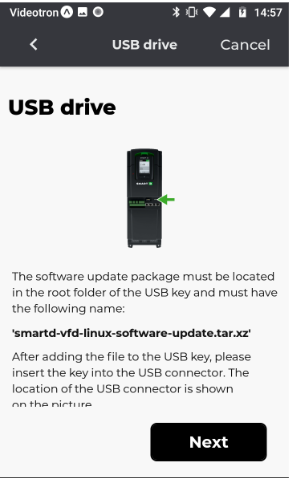
The software update process should then proceed by fetching the packages, and will be ready to start after a few minutes.
TipNote⚓
If the configuration is already set to UPDATE_SOURCE_USB and the USB key is correctly formatted and plugged in but the software update does not seem to progress, you can send a Fetch request to force the software update to check for new packages.
It is possible to place the software update package in a directory on the USB drive but this requires to modify the configuration. E.g. if the package is set in smartd/update/smartd-vfd-linux-software-update.tar.xz on the USB drive, the software update configuration should be set as:
{
"configuration": {
"selected_source": "UPDATE_SOURCE_USB",
"usb_path": "smartd/update"
}
}