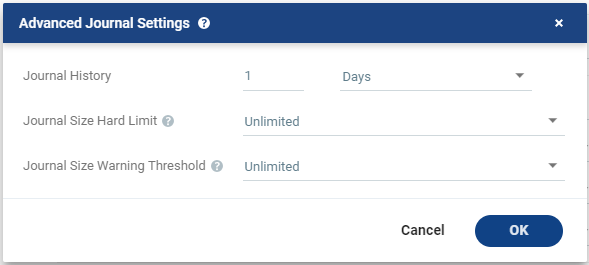
The time that all write commands are saved in the journal.
The longer the information is saved in the journal, the more space is required for each journal in the VPG. |
|
•
|
Number of hours from 1 to 23 |
|
|
•
|
Number of days from 1 to 30 |
|
| Default Journal Storage (Hyper-V), or Default Journal Datastore (vSphere) |
The storage/datastore used for the journal data for each virtual machine in the VPG. | Note: | This field is not relevant when replicating to a vCD recovery site. |
|
|
•
|
Select the storage/datastore accessible to the host.
|
When you select a specific journal storage/datastore, the journals for each virtual machine in the VPG are stored in this storage/datastore, regardless of where the recovery storage/datastore is for each virtual machine. All protected virtual machines are recovered to the hosts that can access the specified journal storage/datastore. |
The maximum size that the journal can grow, either as a percentage or a fixed amount.
The journal is always thin-provisioned. | Note: | The Journal Size Hard Limit applies independently both to the Journal History and also to the Scratch Journal Volume.
|
For Example: If the Journal Size Hard Limit is configured to a maximum size of 160 GB limit, then during Failover Test, both the Journal History and the Scratch Journal Volume together can take up to 320 GB. Each one with a maximum size of 160 GB limit. |
|
•
|
Unlimited: The size of the journal is unlimited and it can grow to the size of the recovery storage/datastore.
|
If Unlimited is selected, Size and Percentage options are not displayed. |
|
•
|
Size (GB): The maximum journal size in GB. |
|
•
|
The minimum journal size, set by Zerto, is 8GB for Hyper-V and vSphere environments, and 10GB for Microsoft Azure environments. |
|
|
•
|
Percentage: The percentage of the virtual machine volume size to which the journal can grow. |
|
•
|
This value can be configured to more than 100% of the protected VM's volume size. |
|
| Journal Size Warning Threshold
|
| The size of the journal that triggers a warning that the journal is nearing its hard limit. |
|
•
|
Unlimited: The size of the journal is unlimited and it can grow to the size of the recovery storage/datastore.
|
If Unlimited is selected, Size and Percentage options are not displayed. |
|
•
|
Size* (GB): The size in GB that will generate a warning. |
|
|
•
|
Percentage*: The percentage of the virtual machine volume size that will generate a warning. |
|
*The values of Size and Percentage must be less than the configured Journal Size Hard Limit so that the warning will be generated when needed.
In addition to the warning threshold, Zerto will issue a message when the free space available for the journal is almost full. |