 |
You.i Engine
|


|
|
You.i Engine
|
|
A layout that positions all of its children in a row, a column, or a 'shaft'.
By default, children are arranged horizontally (i.e. in a row).
This layout respects the padding layout configuration option and the margin per-node layout configuration option.
Container View Template Comments Specification
These values are applied to the comment field of the container composition. All properties are optional.
| Label | Default value | Accepted values | Description |
|---|---|---|---|
| spacing | 10.0 | floating point | The amount of space left between laid-out items. |
| justify | false | true, false | If true, items will be laid-out to take the full width (or height for vertical layouts, or depth for shaft layouts) of the container. Items will be separated by an equal amount of space. |
| orientation | horizontal | horizontal, vertical, or shaft | The orientation in which items will be laid-out in the layout: in a row, a column, or a shaft, respectively. |
| overflow | ignore | ignore, offscreen, wrap, wrap-and-offscreen | The behaviour when items overflow the container. See the 'overflow' section for details. |
| line-gravity | default | default, start, middle, end, justify | The alignment of lines in the non-layout direction. See the 'overflow' section for details. |
The parent layout class may define more properties that can be used.
Children View Template Comments Specification
This class has no configurable per-child properties, except for those of the parent class.
Gravity and Justification
The meaning of the 'gravity' property is slightly altered by this layout. Normally, the gravity is applied to each child of the layout individually. But for linear layouts, the gravity value in the layout direction (for example the horizontal component of the gravity for horizontal linear layouts) is applied to the group of laid-out children rather than to individual children.
When an 'item gravity' per-node layout configuration is set on one (or more) of the children, that child may be aligned separately. The linear layout sorts children within each line in three groups: children aligned at the start of the line, children aligned at the end of the line, and children aligned at the middle of the line. If, during arrangement, the middle children would overlap with either the start or end children, then the middle children are offset appropriately to avoid overlap.
As an example, the following diagram shows using a horizontal layout with two items and a gravity of 'top-right'.
+--------------------------------+
|               +------+ +------+|
|               |Item 1| |Item 2||
|               +------+ +------+|
|                                |
|                                |
+--------------------------------+
The 'justify' property has a special effect: if there are two or more layoutable children in the layout, the children will be laid out so that they fill the whole width of the container (or the full height for vertical layouts, or the full depth for shaft layouts). The amount of space between each pair of child will be kept equal, and will not be smaller than the value of the 'spacing' property. The following diagram shows justification when a gravity of 'bottom-right' is used:
+--------------------------------+
|                                |
|                                |
|+------+    +------+    +------+|
||Item 1|    |Item 2|    |Item 3||
|+------+    +------+    +------+|
+--------------------------------+
Overflow
By default, children are arranged in a single line. If the total length of all items exceeds the dimensions of the parent container in the layout direction, items are allowed to overflow outside of the container. This behaviour can be changed by setting the 'overflow' property.
Four different modes are available:
When one of the wrap overflow modes is used, children may be arranged onto multiple lines. How these lines are arranged can be controlled with the 'line gravity' property. By default, lines are arranged using the same gravity as the layout itself. For example, given a linear layout set with a 'horizontal' orientation, a 'bottom-right' gravity, and enough items to fill two rows, the lines would be aligned to the bottom of the composition (with items within each individual lines being aligned to the right of the composition.)
Lines can also be aligned to the start of the container, the middle of the container, or the end of the container. A 'justify' mode is available to position the lines such that they take up the full height or width of the container, with the amount of space between each pair of lines being equal.
#include <layout/YiLinearLayout.h>
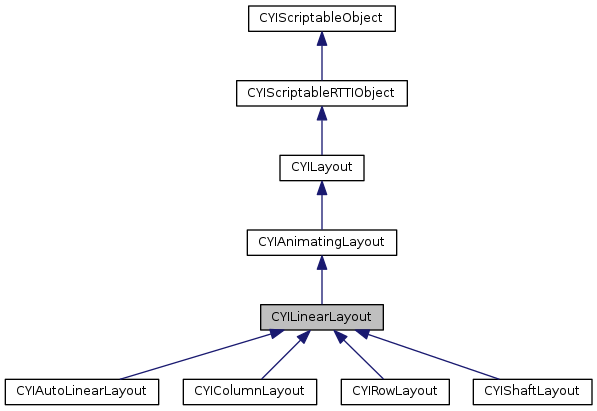
Public Types | |
| enum | ORIENTATION { ORIENTATION_HORIZONTAL, ORIENTATION_VERTICAL, ORIENTATION_SHAFT } |
| enum | OVERFLOW_MODE { OVERFLOW_IGNORE, OVERFLOW_OFFSCREEN, OVERFLOW_WRAP, OVERFLOW_WRAP_AND_MOVE_OFFSCREEN } |
| enum | LINE_GRAVITY { LINE_GRAVITY_DEFAULT, LINE_GRAVITY_START, LINE_GRAVITY_MIDDLE, LINE_GRAVITY_END, LINE_GRAVITY_JUSTIFY } |
 Public Types inherited from CYILayout Public Types inherited from CYILayout | |
| enum | POSITIONING_MODE { SET_POSITION_DIRECTLY, DO_NOT_SET_POSITION_DIRECTLY } |
| typedef CYILayoutConfig::CubeOffset | Padding |
Protected Member Functions | |
| virtual void | Configure () override |
| virtual void | OnMeasure (const CYISceneNode::MeasureSpec &widthSpec, const CYISceneNode::MeasureSpec &heightSpec, const CYISceneNode::MeasureSpec &depthSpec) override |
| virtual void | OnApplyMeasurements () override |
| Protected Member Functions inherited from CYIAnimatingLayout | |
| virtual void | OnMeasurementsApplied () override |
| virtual const CYIRuntimeTypeInfo & | GetLayoutConfigType () const override |
| virtual void | ApplyPosition (CYISceneNode *pChild, const glm::vec3 &vPosition) override |
| virtual void | ApplySize (CYISceneNode *pChild, const glm::vec3 &vSize) override |
| Protected Member Functions inherited from CYILayout | |
| virtual void | OnSceneViewAttached () |
| virtual void | OnMeasurementsCalculated (const CYISceneNode::MeasureSpec &widthSpec, const CYISceneNode::MeasureSpec &heightSpec, const CYISceneNode::MeasureSpec &depthSpec) |
| virtual std::unique_ptr< CYILayoutState > | CreateLayoutStateInstance () const |
| void | CreateLayoutObjectsFor (CYISceneNode *pNode) const |
| CYISceneNode * | GetChild (uint32_t uIndex) const |
| void | ApplyMeasurementsToBackgroundChildren () |
| const Padding & | GetPaddingForChild (const CYISceneNode *pChild) const |
| Protected Member Functions inherited from CYIScriptableRTTIObject | |
| virtual std::pair< const CYIRuntimeTypeInfo *, const void * > | GetRuntimeTypeInfoWithObject () const =0 |
Protected Attributes | |
| float | m_fSpacing |
| bool | m_bJustify |
| ORIENTATION | m_eOrientation |
| OVERFLOW_MODE | m_eOverflowMode |
| LINE_GRAVITY | m_eLineGravity |
| Protected Attributes inherited from CYILayout | |
| CYISceneView * | m_pNode |
| In most cases, this variable is used as a node (thus the name m_pNode ) More... | |
| Padding | m_padding |
| bool | m_bReverseChildrenOrder |
| glm::vec3 | m_vGravity |
| POSITIONING_MODE | m_ePositioningMode |
Additional Inherited Members | |
| Static Public Member Functions inherited from CYILayout | |
| static void | RegisterAllLayouts () |
| static bool | IsLayoutable (const CYISceneNode *pNode) |
| static glm::vec3 | GetDefaultSize (const CYISceneNode *pNode, const CYISceneNode::MeasureSpec &widthSpec, const CYISceneNode::MeasureSpec &heightSpec, const CYISceneNode::MeasureSpec &depthSpec) |
| static void | UpdateMeasuredSizeForFitContent (const CYISceneNode *pNode, glm::vec3 *pMeasuredSize, const glm::vec3 &contentSize, const Padding &padding, const CYISceneNode::MeasureSpec &widthSpec, const CYISceneNode::MeasureSpec &heightSpec, const CYISceneNode::MeasureSpec &depthSpec) |
| static void | UnscaleMeasureSpecs (const glm::vec3 &vScale, CYISceneNode::MeasureSpec *pWidthSpec, CYISceneNode::MeasureSpec *pHeightSpec, CYISceneNode::MeasureSpec *pDepthSpec) |
| static float | CalculateDimension (const CYISceneNode::MeasureSpec &spec, const CYILayoutConfig::SizeConstraint &constraint, float fCurrentValue) |
| Protected Types inherited from CYILayout | |
| enum | DIMENSIONS { DIMENSIONS_NONE = 0x0, DIMENSIONS_X = 0x1, DIMENSIONS_Y = 0x2, DIMENSIONS_Z = 0x4, DIMENSIONS_ALL_BUT_X = DIMENSIONS_Y | DIMENSIONS_Z, DIMENSIONS_ALL_BUT_Y = DIMENSIONS_X | DIMENSIONS_Z, DIMENSIONS_ALL_BUT_Z = DIMENSIONS_X | DIMENSIONS_Y, DIMENSIONS_ALL = DIMENSIONS_X | DIMENSIONS_Y | DIMENSIONS_Z } |
| Static Protected Member Functions inherited from CYILayout | |
| static void | MeasureChildWithMargins (CYISceneNode *pChild, const CYISceneNode::MeasureSpec &parentWidthSpec, const CYISceneNode::MeasureSpec &parentHeightSpec, const CYISceneNode::MeasureSpec &parentDepthSpec, const Padding &padding) |
| static void | MeasureChildWithMargins (CYISceneNode *pChild, const CYISceneNode::MeasureSpec &parentWidthSpec, const CYISceneNode::MeasureSpec &parentHeightSpec, const CYISceneNode::MeasureSpec &parentDepthSpec, const Padding &padding, const glm::vec3 &vChildScale) |
| static CYISceneNode::MeasureSpec | CalculateChildMeasureSpec (const CYISceneNode::MeasureSpec &parentMeasureSpec, float fPadding, const CYILayoutConfig::SizeConstraint &childConstraint, float fChildScale) |
| static bool | UpdateMeasureSpecsForFitContent (const CYISceneNode *pNode, CYISceneNode::MeasureSpec *widthSpec, CYISceneNode::MeasureSpec *heightSpec, CYISceneNode::MeasureSpec *depthSpec) |
| static void | RemeasureChildrenForFillParent (const CYISceneNode *pNode, const glm::vec3 &vParentMeasuredSize, const Padding &padding, DIMENSIONS eDimensionsToRemeasure) |
| static glm::vec3 | GetAdjustedPosition (const glm::vec3 &vDesiredTopLeftPosition, const CYISceneNode *pChild) |
| static glm::vec3 | GetUnadjustedPosition (const glm::vec3 &vCurrentTopLeftPosition, const CYISceneNode *pChild) |
| static glm::vec3 | GetAdjustedMeasuredSize (const CYISceneNode *pChild) |
| static glm::vec3 | GetTopLeftPositionWithGravity (const glm::vec3 &vLayoutGravity, const glm::vec3 &vChildGravity, const glm::vec3 &vContainerTopLeft, const glm::vec3 &vContainerSize, const CYILayout::Padding &padding, const glm::vec3 &vChildSize, const CYILayoutConfig::Margin &margin, const glm::vec3 &vCurrentChildPosition) |
| static void | MeasureBackgroundChildren (CYISceneNode *pNode, const glm::vec3 &vSize) |
| CYILinearLayout::CYILinearLayout | ( | ) |
|
virtual |
|
overrideprotectedvirtual |
Extracts relevant properties the associated scene node and configures this layout with said properties.
Reimplemented from CYIAnimatingLayout.
Reimplemented in CYIAutoLinearLayout, CYIColumnLayout, CYIRowLayout, and CYIShaftLayout.
| LINE_GRAVITY CYILinearLayout::GetLineGravity | ( | ) | const |
| ORIENTATION CYILinearLayout::GetOrientation | ( | ) | const |
| OVERFLOW_MODE CYILinearLayout::GetOverflowMode | ( | ) | const |
| float CYILinearLayout::GetSpacing | ( | ) | const |
| bool CYILinearLayout::IsUsingJustify | ( | ) | const |
|
overrideprotectedvirtual |
Applies the measured sizes of the associate scene node's children.
Implements CYILayout.
|
overrideprotectedvirtual |
Measures the associated scene node, considering its layout configuration constraints (if available) and the provided measure specifications.
Implements CYILayout.
Reimplemented in CYIAutoLinearLayout.
| void CYILinearLayout::SetJustify | ( | bool | bJustify | ) |
Enables or disables justification of laid-out items. By default, justification is disabled.
If enabled, laid-out items will fill the full width (or the full height for vertical layouts, or the full depth for shaft layouts) of the container. The amount of space between each pair of child will be kept equal, and will not be smaller than the value of the 'spacing' property.
| void CYILinearLayout::SetLineGravity | ( | LINE_GRAVITY | eLineGravity | ) |
Sets the line gravity to eLineGravity.
The line gravity determines how individual lines get aligned in the non-layout direction. The default line gravity is 'default', which indicates that the gravity from the layout itself should be used as the line gravity.
| void CYILinearLayout::SetOrientation | ( | ORIENTATION | eOrientation | ) |
Sets the orientation of this layout. The default orientation is horizontal.
| void CYILinearLayout::SetOverflowMode | ( | OVERFLOW_MODE | eMode | ) |
Sets the overflow mode to eMode. The default overflow mode is CYILinearLayout::OVERFLOW_IGNORE.
The overflow mode is used to determine how items should be aligned when the layout runs out of room in the layout direction. For more details, see CYILinearLayout.
| void CYILinearLayout::SetSpacing | ( | float | fSpacing | ) |
Sets the spacing value to fSpacing. The default spacing is 10.0f.
The spacing is extra 'space' that will be added between laid-out items by the linear layout.
|
protected |
|
protected |
|
protected |
|
protected |
|
protected |
 1.8.11