 |
You.i Engine
|


|
|
You.i Engine
|
|
Defines a target for the rendering results to be sent to.
Screen and Offscreen types are supported and can be created using the factory methods in this class.
User will define a render target with its type and dimensions. In most cases, this will be handled during the AE import process.
After a render target object is created, it is attached to a CYISceneNode.The root of any composition imported from AE will automatically be given a render target.
For an offscreen target, even though it would be possible to calculate target dimensions based on the union of the bounding boxes of the children, it is better to set it directly by the specified AE composition size. Once this target is created, its dimensions will not change.
Users can also request the target buffer area to be cleared by setting the CLEAR attribute and the color to use. When this attribute is set, as soon as we switch to this new target, the contents of that target are cleared before rendering anything else into it.
At a high level, here is how the rendering process will look like :
all the children will rendered into this new target
#include <renderer/YiRenderTarget.h>
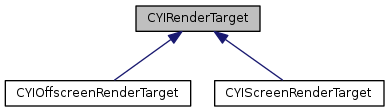
Public Types | |
| enum | RENDER_TARGET_ATTRIBUTE { CLEAR_COLOR_BUFFER = 1, CLEAR_DEPTH_BUFFER = 2, CLEAR = CLEAR_COLOR_BUFFER | CLEAR_DEPTH_BUFFER } |
| enum | RENDER_TARGET_TYPE { SCREEN = 1, OFFSCREEN_COLOR_ONLY, OFFSCREEN_DEPTH_ONLY, OFFSCREEN_COLOR_AND_DEPTH } |
Public Member Functions | |
| virtual | ~CYIRenderTarget () |
| void | SetViewport (const CYIViewport &viewport) |
| const CYIViewport & | GetViewport () const |
| std::shared_ptr< IYIGPUObject > | GetFramebuffer () const |
| std::shared_ptr< CYIAssetFramebuffer > | GetFramebufferAsset () const |
| RENDER_TARGET_TYPE | GetTargetType () const |
| void | SetDeviceHorizontalPixelRatio (float fDevicePixelRatio) |
| void | SetDeviceVerticalPixelRatio (float fDevicePixelRatio) |
| void | SetDeviceDiagonalPixelRatio (float fDevicePixelRatio) |
| float | GetDeviceHorizontalPixelRatio () const |
| float | GetDeviceVerticalPixelRatio () const |
| float | GetDeviceDiagonalPixelRatio () const |
| void | SetClearColor (const CYIColor &clearColor) |
| const CYIColor & | GetClearColor () const |
| void | SetAttribute (RENDER_TARGET_ATTRIBUTE eAttribute, bool bValue) |
| bool | GetAttribute (RENDER_TARGET_ATTRIBUTE eAttribute) const |
Static Public Member Functions | |
| static std::unique_ptr< CYIScreenRenderTarget > | CreateScreenTarget (const CYIViewport &viewport) |
| static std::unique_ptr< CYIOffscreenRenderTarget > | CreateOffscreenTarget (RENDER_TARGET_TYPE eTargetType, uint32_t uTargetWidth, uint32_t uTargetHeight) |
Protected Member Functions | |
| CYIRenderTarget () | |
Protected Attributes | |
| std::shared_ptr< CYIAssetFramebuffer > | m_pFramebuffer |
Specifies the different types of Render Targets supported
|
virtual |
|
protected |
|
static |
Creates a new offscreen render target with type eTargetType. Initializes the target size to uTargetWidth and uTargetHeight. The viewport will be initialized to (0, 0, uTargetWidth, uTargetHeight).
|
static |
Creates a new screen render target and initializes it with viewport. To initialize the viewport, users should query the dimensions of the screen using GetSurface()->GetWidth(), GetSurface()->GetHeight()
| bool CYIRenderTarget::GetAttribute | ( | RENDER_TARGET_ATTRIBUTE | eAttribute | ) | const |
| const CYIColor& CYIRenderTarget::GetClearColor | ( | ) | const |
Returns the color to use for clearing the background.
| float CYIRenderTarget::GetDeviceDiagonalPixelRatio | ( | ) | const |
Get the device diagonal pixel ratio. Using the After Effects workflow, this value will represent the ratio between the designed scene dimensions and the application's surface dimensions.
For instance, a composition designed for 2048 x 1536 but rendered on a 1024 x 768 screen will have a horizontal pixel ratio of 0.5
| float CYIRenderTarget::GetDeviceHorizontalPixelRatio | ( | ) | const |
Get the device horizontal pixel ratio. Using the After Effects workflow, this value will represent the ratio between the designed scene dimensions and the application's surface dimensions.
For instance, a composition designed for 2048 x 1536 but rendered on a 1024 x 768 screen will have a horizontal pixel ratio of 0.5
| float CYIRenderTarget::GetDeviceVerticalPixelRatio | ( | ) | const |
Get the device vertical pixel ratio. Using the After Effects workflow, this value will represent the ratio between the designed scene dimensions and the application's surface dimensions.
For instance, a composition designed for 2048 x 1536 but rendered on a 1024 x 768 screen will have a horizontal pixel ratio of 0.5
| std::shared_ptr<IYIGPUObject> CYIRenderTarget::GetFramebuffer | ( | ) | const |
Returns the framebuffer object for this render target.
| std::shared_ptr<CYIAssetFramebuffer> CYIRenderTarget::GetFramebufferAsset | ( | ) | const |
Returns the asset that backs this render target's frame buffer object.
| RENDER_TARGET_TYPE CYIRenderTarget::GetTargetType | ( | ) | const |
Returns the Render target buffer type.
| const CYIViewport& CYIRenderTarget::GetViewport | ( | ) | const |
Returns the viewport.
| void CYIRenderTarget::SetAttribute | ( | RENDER_TARGET_ATTRIBUTE | eAttribute, |
| bool | bValue | ||
| ) |
| void CYIRenderTarget::SetClearColor | ( | const CYIColor & | clearColor | ) |
Sets the color to use for clearing the background.
| void CYIRenderTarget::SetDeviceDiagonalPixelRatio | ( | float | fDevicePixelRatio | ) |
Set the device diagonal pixel ratio. Using the After Effects workflow, this value will represent the ratio between the designed scene dimensions and the application's surface dimensions.
For instance, a composition designed for 2048 x 1536 but rendered on a 1024 x 768 screen will have a horizontal pixel ratio of 0.5
| void CYIRenderTarget::SetDeviceHorizontalPixelRatio | ( | float | fDevicePixelRatio | ) |
Set the device horizontal pixel ratio. Using the After Effects workflow, this value will represent the ratio between the designed scene dimensions and the application's surface dimensions.
For instance, a composition designed for 2048 x 1536 but rendered on a 1024 x 768 screen will have a horizontal pixel ratio of 0.5
| void CYIRenderTarget::SetDeviceVerticalPixelRatio | ( | float | fDevicePixelRatio | ) |
Set the device vertical pixel ratio Using the After Effects workflow, this value will represent the ratio between the designed scene dimensions and the application's surface dimensions.
For instance, a composition designed for 2048 x 1536 but rendered on a 1024 x 768 screen will have a vertical pixel ratio of 0.5
| void CYIRenderTarget::SetViewport | ( | const CYIViewport & | viewport | ) |
Sets the viewport. Values here are relative to the dimensions of where the rendering will happen. In case of a Screen target, users should query the dimensions of the screen using GetSurface()->GetWidth(), GetSurface()->GetHeight() and set an appropriate viewport. For an Offscreen target, viewport can be automatically set by using the information specified in the CreateOffscreenTarget() call since the FBO dimensions will match the dimension supplied in this call.
|
protected |
 1.8.11