Installing Enterprise Steam
Enterprise Steam is supported on Ubuntu and Red Hat Enterprise Linux. Be sure to follow the instructions for your platform:
Notes:
- Admins should verify whether their Hadoop environment requires sudo. If it does, then users must have a root password/root access.
- This installation creates a SQLite database.
Obtaining the License Key
Contact H2O Sales to obtain a license key. The Enterprise Steam Admin should save this license file on his/her local machine. The Enterprise Steam Admin will be prompted to enter this license key the first time that Enterprise Steam is started. (See Uploading a License File section.)
Ubuntu Installation
This section describes how to install Enterprise Steam on Ubuntu.
Requirements for Enterprise Steam with Ubuntu
- Ubuntu 12.04 or greater
- Enterprise Steam .deb file. This is available on the Steam download page.
- Chrome browser with an Internet connection. Note that Chrome is currently the only supported browser.
- H2O driver for your version of Hadoop. This is available from the H2O Download page. Click the Install on Hadoop tab, and select the correct version for your environment.
- HAProxy 1.5 or greater. For Ubuntu, this is available from haproxy.debian.net.
Install HAProxy for Ubuntu
This section describes how to install HAProxy 1.5. You can skip this section if your environment already has HAProxy 1.5.or greater.
In your browser, go to https://haproxy.debian.net.
Select the system and version that you are running, then select an HAProxy version of 1.5-stable or greater.
Open a Terminal window and run the commands that are listed (using
sudoif required). The example below shows the commands to use with Ubuntu version Trusty (14.04 LTS) and HAProxy version 1.7-stable.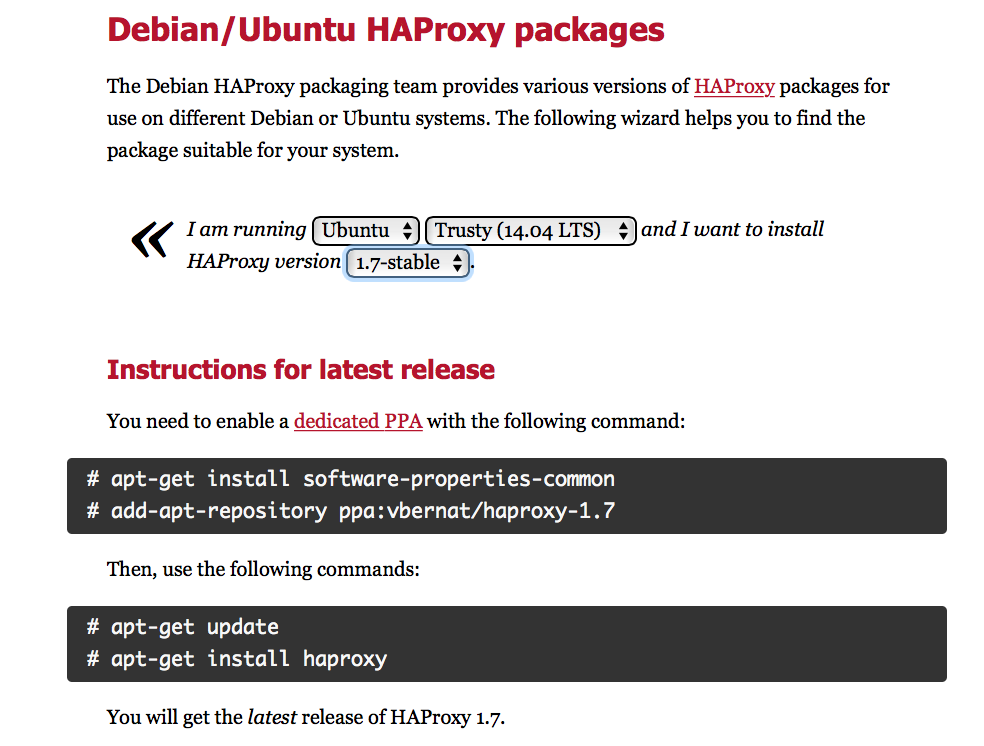
Install Enterprise Steam on Ubuntu
- On your local machine, download the Enterprise Steam .deb from the Steam download page.
- Review and accepts the terms of the EULA.
- Open a terminal window and ssh to your Hadoop edge node.
ssh <user>@<hadoop_edge_node>
- Copy the Enterprise Steam .deb file to your edge node.
scp <user>@<hadoop_edge_node>:./esteam_1.0.0_amd64.deb .
- Unpackage the Enterprise Steam .deb file.
sudo dpkg -i esteam_1.0.0_amd64.deb
- Set the administrator username and password.
sudo service steam set-admin
username: administrator
password: ***********
Install the certificate and private key for the Enterprise Steam server using one of the following methods:
Add a certificate in /etc/steam/private_key.pem, /etc/steam/cert.pem.
Or
sudo service steam create-self-signed-cert
(Optional) Change the service port numbers in /etc/steam/steam.conf.
At this point, you are ready to Start Enterprise Steam.
RHEL Installation
This section describes how to install Enterprise Steam on Red Hat Enterprise Linux.
Requirements for Enterprise Steam with RHEL
- RHEL 6.7 or greater. Note that HAProxy is already included with this version of Red Hat.
- Enterprise Steam .rpm file. This is available from the Steam download page.
- Chrome browser with an Internet connection. Note that Chrome is currently the only supported browser.
- H2O driver for your version of Hadoop. This is available from the H2O Download page. Click the Install on Hadoop tab, and select the correct version for your environment.
Install HAProxy on RHEL
RHEL 6.7 or greater includes HAProxy. Run the following command if you have not already installed HAProxy. Note that SSL must be enabled before you run this command.
sudo yum haproxy
Install Enterprise Steam on RHEL
- On your local machine, download the Enterprise Steam .rpm file from the Steam download page.
- Review and accept the terms of the EULA.
- Open a terminal window and ssh to your Hadoop edge node.
ssh <user>@<hadoop_edge_node>
- Copy the Enterprise Steam .rpm file to your edge node.
scp <user>@<hadoop_edge_node>:./esteam_1.0.0_amd64.rpm .
- Install the Enterprise Steam .rpm file.
sudo rpm -i <esteam_rpm_package>
- Set the administrator username and password.
sudo service steam set-admin
username: administrator
password: ***********
Install the certificate and private key for the Enterprise Steam server using one of the following methods:
Add a certificate in /etc/steam/private_key.pem, /etc/steam/cert.pem.
Or
sudo service steam create-self-signed-cert
(Optional) Change the service port numbers in /etc/steam/steam.conf.
At this point, you are ready to Start Enterprise Steam.