
System reset
How to reset a locked out Clean Power VFD ?⚓
There are two ways to reset a locked-out Clean Power VFD.
- by sending the reset command to the Clean Power VFD.
- by executing a complete power cycle.
Reset by sending the reset command from the mobile App⚓
The reset can be executed through a paired smartPhone:
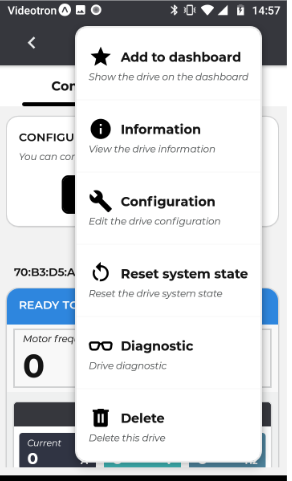
From the connected Clean Power VFD dashboard screen, select Menu.
in the displayed action lists, select Reset system state.
Follow the instruction displayed on the screen.
Reset by sending the reset command using the Modbus TCP register SYSR⚓
The reset can be executed remotely by sending the system reset command from a connected Ethernet network, using the appropriate Modbus command.
Description of the Modbus system reset can be find in this document, section Networks and communication>Modbus TCP
Reset with Power cycle.⚓
To execute a reset system of your Clean Power VFD, you must do a complete off / on power cycle of the Clean Power VFD.
If your Clean Power VFD is connected to an external 24VDC power supply, you must power off this power supply prior to powering off the main supply power to the Clean Power VFD.
Power off the main input AC power and wait for 5 minutes to ensure all capacitors are discharged.
Power on the main input AC power and the external 24VDC power supply if any. Your Clean Power VFD will reboot and then will go into ready-to-run status.
Prior to executing a system reset, please carefully read the safety messages related to powering the Clean Power VFD.