 |
You.i Engine
|


|
|
You.i Engine
|
|
A dev widget used to display text to the user.
This dev widget can be configured in one of two modes: floating or non-floating.
In non-floating mode, which is the default, a full-screen view is displayed with the text in a scrolling view. Clicking the on-screen X or hitting the ESC key on a keyboard dismisses the view.
In floating mode, the text is overlaid on top of the app in one of the corners. Clicking the view moves it between the app corners.
The title of the widget is displayed at the top of the text view.
#include <debug/YiDevWidgetWithText.h>
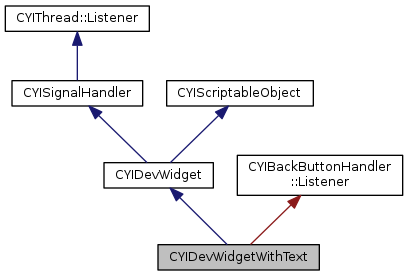
Protected Member Functions | |
| virtual void | OnDraw () override |
| virtual bool | OnUpdate (bool *pbSkipUpdate=nullptr) override |
| virtual void | OnPanelItemClicked () override |
| virtual void | OnShow () |
| virtual void | OnHide () |
| virtual bool | OnHandleActionInputs (int32_t nX, int32_t nY, int32_t nWheelDelta, uint8_t uButton, YI_EVENT_TYPE eEventType, uint8_t uPointerID, bool bHover) override |
| virtual bool | OnHandleKeyInputs (const CYIKeyEvent &keyEvent) override |
| virtual bool | OnBackButtonPressed () override |
| void | UpdateText () |
| void | OnClicked () |
 Protected Member Functions inherited from CYIDevWidget Protected Member Functions inherited from CYIDevWidget | |
| void | SetUseSimulatedKeys (bool bUseSimulatedKeys) |
| void | SetCaptureAllEvents (bool bCaptureAllEvents) |
| void | SetUsesConfigurationItems (bool bUsesConfigurationItems) |
| virtual std::vector< std::pair< CYIString, CYIString > > | GetConfigurationButtonTitles () |
| CYISceneNode * | GetLogicalRoot () const |
Additional Inherited Members | |
| Public Types inherited from CYIDevWidget | |
| enum | STATE { OFF, ON, STATELESS, DISABLED } |
| Protected Attributes inherited from CYIDevWidget | |
| CYIDevPanel * | m_pParentPanel |
| uint32_t | m_uIndexInPanel |
| STATE | m_eState |
| CYIString | m_title |
| CYIString | m_subtitle |
| CYIDevWidgetWithText::CYIDevWidgetWithText | ( | const CYIString & | title = "Untitled Text Widget", |
| const CYIString & | subtitle = "" |
||
| ) |
| void CYIDevWidgetWithText::AddLine | ( | const CYIString & | text, |
| const CYIGeometryBatch::TextSettings & | settings = CYIGeometryBatch::TextSettings() |
||
| ) |
Adds a single line of text to the existing text. The line of text can be styled using the settings parameter.
|
overrideprotectedvirtual |
Will be called when back button pressed is notified by NotifyBackButtonPressed if this listener is registered. Return true if the back button has been handled. Return false to pass the notification on to the next registered listener, or back to the system.
Implements CYIBackButtonHandler::Listener.
|
protected |
Called when the floating text view is clicked.
|
overrideprotectedvirtual |
Called during the app's Draw cycle. This is called after the scene tree has been rendered (and after the dev panel itself has been rendered). Widgets that make use of CYIGeometryBatch will typically want to implement this function.
Reimplemented from CYIDevWidget.
|
overrideprotectedvirtual |
Called when an action input occurs. If true is returned, the input will not be propagated to the app.
Reimplemented from CYIDevWidget.
|
overrideprotectedvirtual |
Called when a key event occurs. If true is returned, the event will not be propagated to the app.
Reimplemented from CYIDevWidget.
|
protectedvirtual |
|
overrideprotectedvirtual |
Called when the widget's item in the dev panel is clicked. This is where a widgets should implement its behaviour. Widgets often update their state when this function is called.
Implements CYIDevWidget.
|
protectedvirtual |
|
overrideprotectedvirtual |
Called during the app's Update cycle. This is called prior to the scene tree's update. The pbSkipUpdate boolean can be set to true to skip updating the scene tree. This function should return true if a draw is required.
Reimplemented from CYIDevWidget.
| void CYIDevWidgetWithText::SetFloatingMode | ( | bool | bFloating | ) |
Sets the floating mode to bFloating. If this function is called with true, the text will be displayed in a floating overlay. Otherwise, the text will be displayed in a full-screen scrolling view.
|
virtual |
Sets the text to display to text. The text can be styled using the settings parameter.
'Quake-style' coloring is supported within the text. For example, 'A word in ^009blue' would display the word 'blue' in blue.
|
protected |
 1.8.11