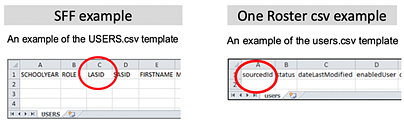
 In
the Ed UI, this is referred to as the Student
Number for students and Staff
Number for teachers. For the
purposes of co-rostering, this field is referred to as LASID.
In
the Ed UI, this is referred to as the Student
Number for students and Staff
Number for teachers. For the
purposes of co-rostering, this field is referred to as LASID. (LASID = Student/Staff Number = sourcedId)
In Ed, rosters can be bulk-rostered using roster files or API, or rosters can be created manually within the Ed platform. The key field for co-rostering is one of the following:
● LASID field in the Users data file when rostering using Simple File Format (SFF)
● sourcedId field in the Users data file when rostering using OneRoster CSV or API
● USERNAME** when using any method
**Note: Username is an acceptable identifier to use, but not recommended because the Username value can be changed, which can affect connectivity.
In
the Ed UI, this is referred to as the Student
Number for students and Staff
Number for teachers. For the
purposes of co-rostering, this field is referred to as LASID.
(LASID = Student/Staff Number = sourcedId)
The LASID field is not changeable. Creating a user account with a different LASID is considered a different user account in the platform. A user with one LASID cannot be migrated to a different LASID. HMH recommends that the LASID value be something that will not change through the lifetime of the user, (for example: a student ID or employee ID).
If you have rostered to Ed in the past, you can easily find which field value is the LASID or the Username.
1. Log into Ed as district administrator.
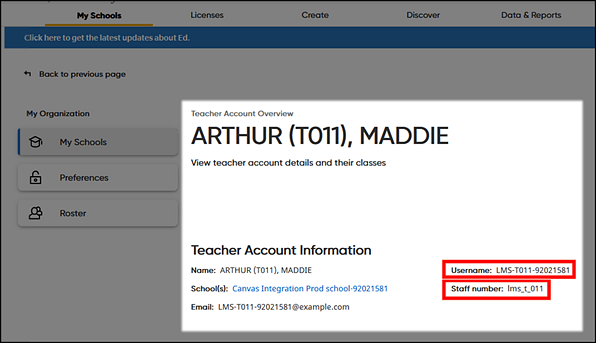
2. Find a teacher account by selecting the School, selecting the Teachers filter, and then selecting the teacher from the list. (See View and Edit Teacher Information for details.)
The LASID (preferred identifier for the integration) is reported as the Staff Number. In this example, the Staff Number value is "lms_t_011". The Username is clearly marked.
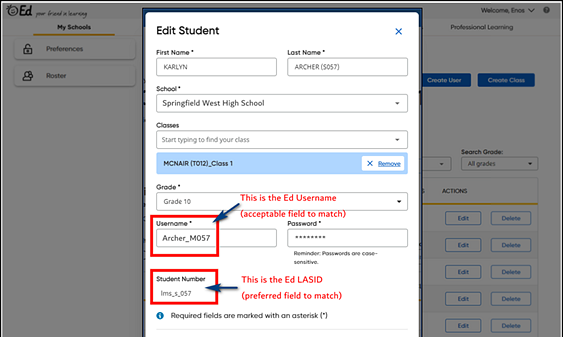
3. Find a student account by selecting the School, selecting the Students filter, and then selecting the student from the list. (See View and Edit Student Information for details.)
The LASID is reported as the Student Number field. In this example, the Student Number value is “lms_s_057”. The Username is clearly marked.
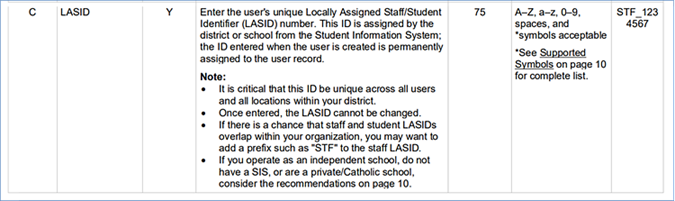
Simple File Format (SFF) method
➔ If your organization rosters to Ed using SFF, locate the LASID field in the USERS data file.
Details about the SFF USERS file are provided
in the following topic: HMH Rostering Service and Log In Help: SFF-USERS File Details 

OneRoster CSV or API
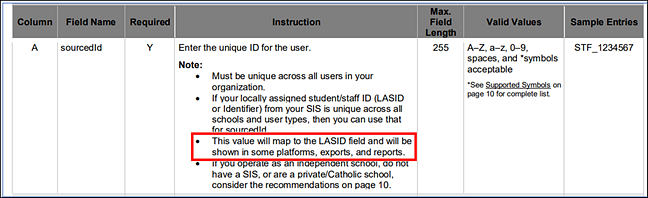
➔ If your organization rosters to Ed using OneRoster 1.1 CSV, identify the LASID by locating the sourcedId field value in the Users data file.
Details about the OneRoster 1.1 CSV users file
are provided in the following topic: HMH Rostering Service and Log
In Help: OneRoster 1.1 users File

How the sourcedId field will be used as the LASID field is defined in the details, as shown below.
If you use a rostering service provider (such as Infinite Campus or ClassLink) that formats your import files for OneRoster API, it may not be easy to see the values of the users.sourcedId field. In that case, either contact your vendor for this information, or complete an import into Ed and then use the steps for "Identifying the LASID field in Ed" described above.
Return to:
Required Prework: Co-Roster Ed-Canvas with Shared Identifier
Required Prework: Co-Roster Ed-Schoology with Shared Identifier