Editing VRA Settings
If you need to change the connection method (VIB or password), host password, VRA group, or network settings for a VRA, for example when the gateway to the VRA is changed, you can do this by editing the VRA.
To edit the VRA:
| 1. | In the Zerto User Interface, click SETUP > VRAs. |
| 2. | Select the VRA to edit, and click MORE > Edit. |
The Edit VRA dialog is displayed.
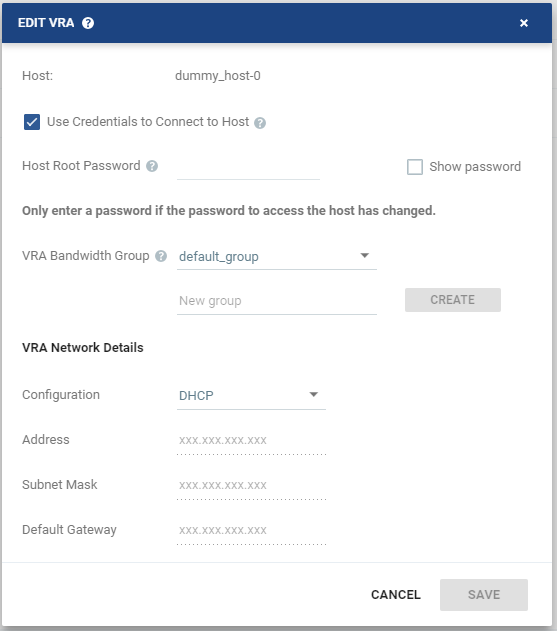
| 3. | Edit the group if required. |
|
You can change the free text to change the group that a VRA belongs. If you create a group and then change the name when editing the VRA so that there is no VRA in the site that belongs to the originally specified group, the group is automatically deleted from the system. |
| 4. | To create a new group, enter the new group name over the text New group, then click CREATE. |
| 5. | Edit the VRA network settings as follows: |
|
Either have the IP address allocated via a static IP address or a DHCP server. Zerto strongly recommends using only a static IP. If the VRA was originally installed with a static IP, you cannot change this to DHCP. If the VRA was originally installed to use a DHCP server, you can change this to use a static IP. |
|||
|
The static IP address for the VRA to communicate with the Zerto Virtual Manager. |
|||
|
The subnet mask for the network. The default value is 255.255.255.0 |
|||
|
The default mask for the network. |
| 6. | Click SAVE. |
The following folder is created as part of the VRA installation and must not be removed:
C:\zerto-temp-<storage_name> – VRA installation files. <storage_name> signifies the target host.
When a VRA is installed using the local storage (c:\), there is only one folder with this name.
When a VRA is installed on remote storage, a second folder with the same name is also created where the VRA is installed.
See also:
| • | Installing a VRA |
| • | Upgrading VRAs |
| • | Editing the VRA Connection Method or Password |
| • | Evacuating a Recovery VRA |
| • | Uninstalling VRAs |
| • | Handling a VRA in an Error State (Ghost VRA) |
| • | Managing Protection During VMware Host Maintenance |
| • | Managing Protection When Moving a Host to a Different Cluster |