Removing Virtual Machines from a VPG
If a user removes a virtual machine from a VPG, the checkpoints of the VPG are retained.
|
Note:
|
Once a virtual machine is removed, it is no longer possible to recover it. |
To remove a virtual machine from an existing VPG:
|
1.
|
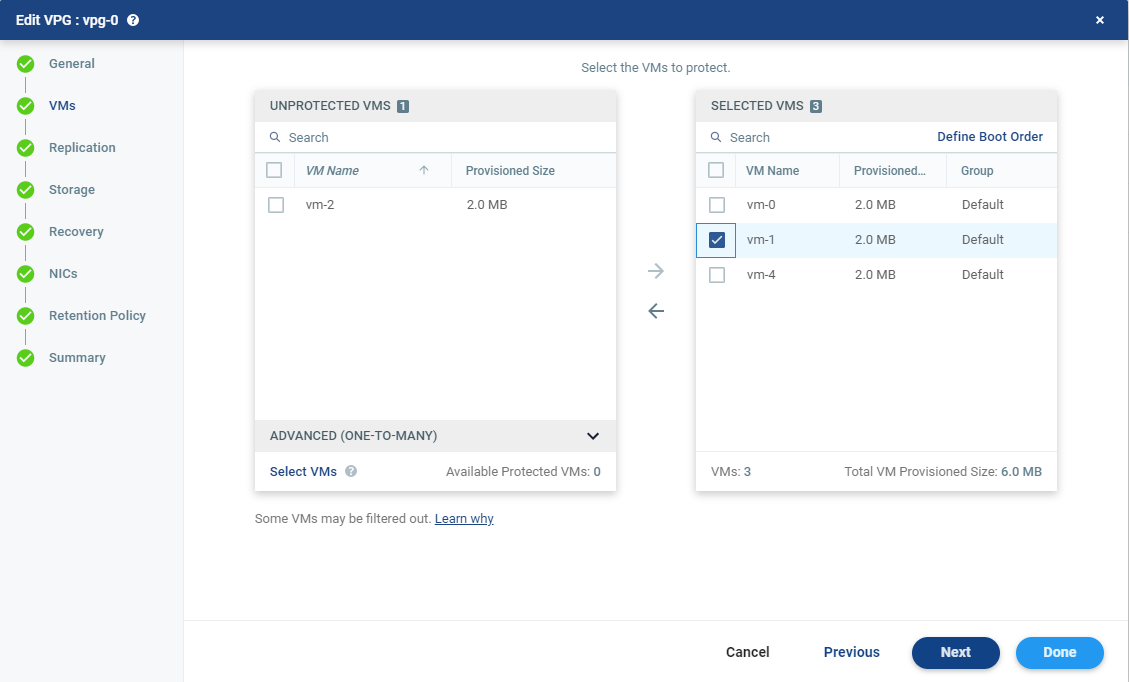
In the VPGs tab in the Zerto User Interface, select the VPG and click MORE > Edit VPG. You can also select the VPG to display the VPG details and click EDIT VPG. |
The Edit VPG wizard is displayed, enabling you to edit the VPG, including removing virtual machines from the VPG.
|
2.
|
In the VMs step, select the virtual machines to remove and click the arrow pointing left to remove these machines from the VPG. The selected virtual machines will no longer be protected. |
|
4.
|
Select Keep the recovery disks at the peer site if you might reprotect the virtual machines. Checking this option means that the target replica disks for the virtual machines are saved so that they can be used as preseeded disks if the virtual machines are re-protected. |
The VPG configuration is updated. The VRA on the recovery site that handles the replication for the VPG is updated including keeping or removing the replicated data for the deleted VM, dependent on the Keep the recovery disks at the peer site setting during the deletion.
The locations of the saved target disks are specified in the description of the event for the virtual machines being removed, event EV0040, displayed in MONITORING > EVENTS.
See also: