Log File Location and Basics
In addition to topics listed on this page, see the following:
About Log Files
Many of the Connectivity Hub components write information about processes running on the server(s) to log files.
-
Connectivity Hub log files are located in the {Installation Root}\Quartz Server\Logs folder on each server where Connectivity Hub is installed.
-
For example: C:\Program Files\BA Insight\BA Insight Connector Framework\Quartz Server\Logs
Naming Convention
The naming convention for the ConnectivityHub log files is similar to the following:
ConnectorFramework-yyyyMMdd.N.log
Log Level
You configure these logs to record various types of activities by specifying a log level.
- For example, if you specify the Trace log level for log files written to the
ESCfolder, Connectivity Hub writes log files with the dump information (in CSV, XML, and other formats).- The names of these dump files are prefixed with
ConnectorFramework, and have the.dumpfile extension.
- The names of these dump files are prefixed with
- Logs work independently from each other. This means that you can specify the log level on your main server to, for example,
TRACE. - At the same time, you can set the log levels on IndexServer1 and IndexServer2 to
INFOandWARN, respectively. - To obtain the logging information from all of your servers, you must collect the log files from each of those servers.
By default, ConnectivityHub ensures that the log files retain the 10 most recently dated logs, while all other log files are automatically removed.
Troubleshooting Tab
- To access the Troubleshooting section, from the ConnectivityHub top horizontal menu, select Content Sources.
- Select your content source.
- Select the Troubleshooting tab on the far right.
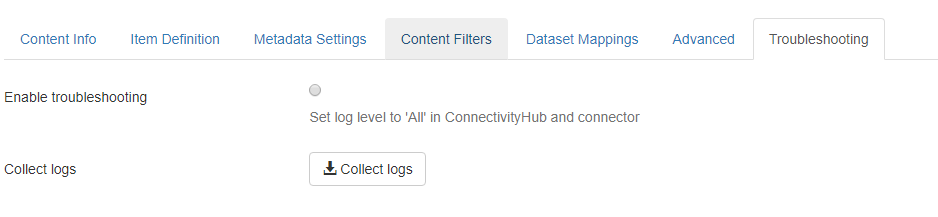
The Troubleshooting tab provides you the option to change your Log Level to ‘All’ on the following:
- Connectivity Hub (Admin and Quartz Server)
and - The Connector the content source is associated with.
This feature is meant to enable you to identify and resolve any issues that might occur when you run jobs or Target syncs.
After troubleshooting has been enabled, the Collect Logs option (shown below) downloads a zip file that contains log files:
- Quartz Server logs
- Admin Site logs
- Connector logs