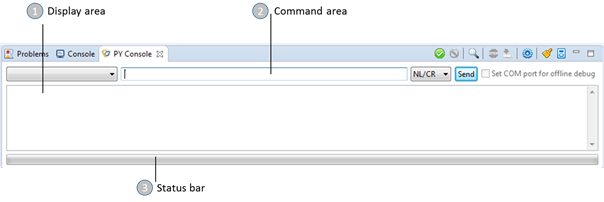
The Py console enables running Python scripts on the module.
The Py console contains the following areas:
1. Display area – Displays the messages from the module, such as commands results and the connection COM result.
2. Command area – Enables entering commands.
3. Status bar – Displays the progress of download and upload operations.
The following table describes the icons in the Py Console toolbar:
|
Icon |
Name |
Description |
|
|
Connect COM port |
Connects to the COM port that is selected in the Settings. |
|
|
Disconnect COM port |
Disconnects from the COM port. |
|
|
AutoConnect COM Port |
Automatically connects to the COM port that is defined in the Settings. |
|
|
Abort transfer |
Stops transferring the file to the module. |
|
|
File Manager |
Opens the File Manager, which enables viewing files in the module. |
|
|
Settings |
Configures the settings that are used to connect to the module. |
|
|
Clear Log |
Clears the display area. |
|
|
Set Ports Simulation |
Enables time logging. |


