Use the following AT command:
AT#WSCRIPT=“<script_name>“,<size>[,<know-how>]
where
<script_name>: file name
<size>: file size (number of bytes)
<know-how>: (optional) know how protection, 1 = on, 0 = off (default)
The script, the compiled script, any text or binary file, can be downloaded to the module using the AT#WSCRIPT command. In order to guarantee your company know-how, you have the option to hide the script text so that the AT#RSCRIPT command does not return the text of the script and keeps it "confidential", you can see the name of the script only using the AT#LSCRIPT command.
In order to download the, optionally compiled, Python script you have to choose a name for your script on the module, taking care of the following:
•the extension for scripts is .py;
•the extension for compiled scripts is .pyc;
•any or no extension is permitted for generic text or binary file;
•the maximum file name length allowed is 16 characters;
•file names are case sensitive.
Then you have to find out the exact size in bytes of the script or compiled script, or generic text or binary file. For example, right clicking on the file and selecting “size” in “properties” (attention: this is different from selecting “size on disk”).
It is important for large files, compared to module serial port buffer size of 4096 bytes, to activate hardware flow control on your terminal emulator.
It is possible to overwrite an existing file, there is no need to delete old one first.
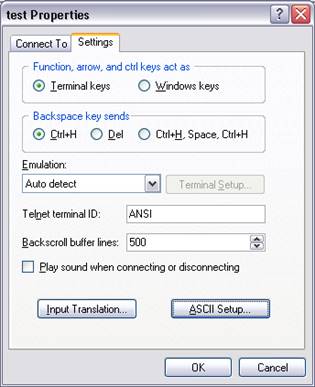
When using standard Windows terminal emulator Hyper Terminal refer to “Send Text file” function.
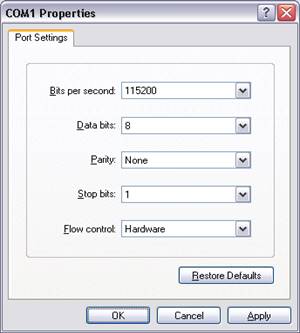
In Hyper Terminal application select “Hardware” flow control in serial settings.
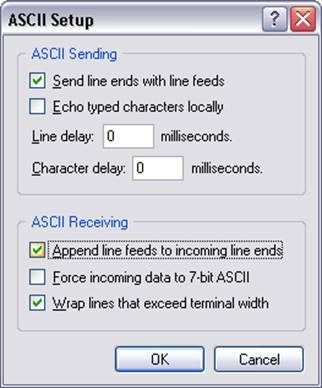
In ASCII Setup set “Send line ends with line feeds” and “Append line feeds to incoming line ends”.
Type for example
AT#WSCRIPT=”a.py”,110
wait for the prompt
>>>
and use “Send Text file” selecting the proper file.
Wait for the result: OK or ERROR.