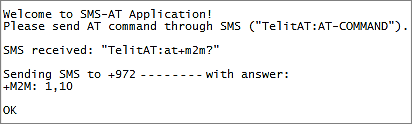
The application allows the user to send AT Commands to the module as SMS messages and receive an SMS message with their response.
* Before every command sent, the string “TelitAT:” must be entered.
Example: TelitAT:at+m2m?
M2M_main.c
•Open USB/UART
•Enable receiving SMS indications using the function 'm2m_sms_enable_new_message_indication()'
•Wait for incoming SMS messages
M2M_net.c
•The function 'M2M_onMsgIndEvent' is called when a new SMS message arrives
•Send to Process 1 with the message index
M2M_proc1.c
•Set the variable 'key_word' to the key word that should be sent as part of the SMS. In this example the key word is 'TelitAT:'
•Set the AT commands parser
•Set the SMS mode to text
•Read the SMS message
•Search for the key word ' TelitAT:' in the SMS message
•If the key word exists, execute the AT command that follows it.
M2M_atRsp.c
•Send SMS with the AT command response to the sending number