|
Aperture Rules Editor |
  
|
|
Aperture Rules Editor |
|
Create custom "rules" to load-in any aperture list file.

 Online Movie: Import Aperture List using Aperture Rules
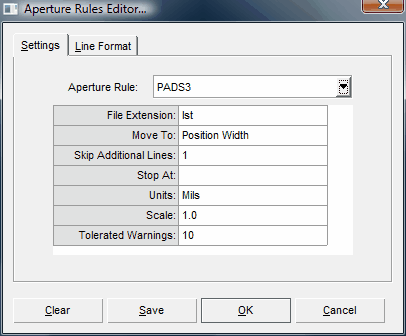
Aperture Rule:
This drop down contains all available aperture rules. Each aperture rule is stored as a file (*.rul) in the DFM Now! sub-folder "aptrules".
File Extension:
Aperture files generated from a CAD system usually have a defined file extension. This helps DFM Now! determine which Aperture rule to use during gerber import.
Move To:
Aperture files generally have non-essential text at the beginning (such as part number, time created, etc.). This lets DFM Now! ignore all text lines until the defined "Move To" text is found. If left empty, DFM Now! will start reading apertures at the first line.
Skip Additional Lines:
This allows DFM Now! to additionally skip lines after Move To.
Stop At:
Tells DFM Now! to stop reading aperture lines once this text has been detected.
Units:
Units for aperture sizes. Choose from: Inch, Mil, or Millimeter.
Scale:
Scale value used for aperture sizes. 1 is default.
Tolerated Warnings:
Determines how many warnings (per Aperture Rule File) DFM Now! will allow before choosing to use another aperture rules files.
Line Parameters:
[S] = Skip
[D] = Dcode
[X] = X-Size
[Y] = Y-Size
[R] = Rotation
[T] = Thermal Tie Width
[I] = ID
[O] = OD
[A] = Aperture
[M] = Misc
Line Example #1:
RECTANGLE 100.5 20 Flash D100
"RECTANGLE" [X] [Y] [S] D[D]
Line Example #2:
D35 Thermal 80 Yes 55
D[D] "Thermal" [O] [S] [I]
 Note: DFM Now! includes over 24 default Aperture Rules. Reviewing these default Aperture Rules is a great way to determine how parameters are used to create a successful Aperture Rules File.