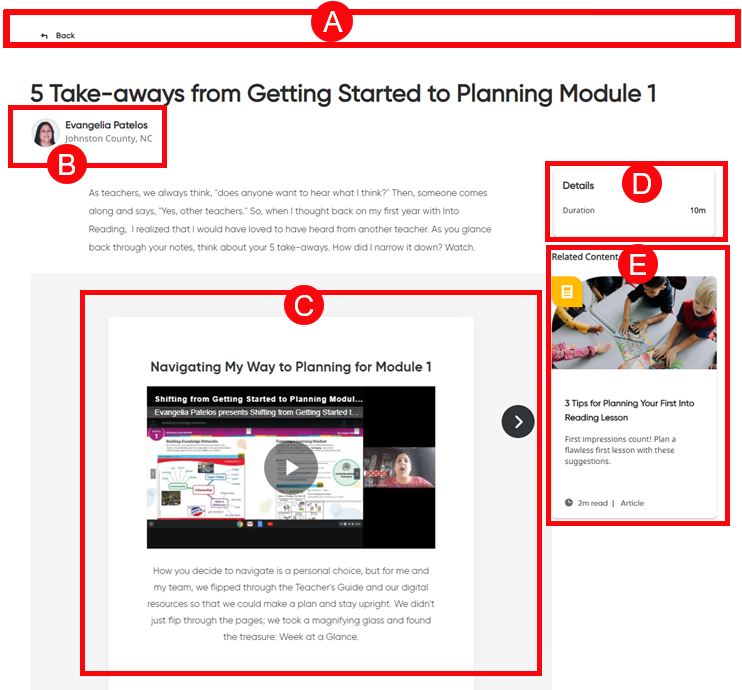
Once you open a category on the Teacher's Corner page and/or select a resource to view, the page provides important information and interactive resources.
➔ Click a letter or outlined area to view Teacher's Corner – Resource page details.
|
|
Top Panel |
|
|
|
|
➔ Select the Teacher's Corner tab on the top menu bar to return to the main page of Teacher's Corner. or Click |
|
Contributor Name and Link |
||
|
|
➔ Click the contributor's name to open the Profile page and see additional resources shared by this contributor. |
|
|
Resource Content |
||
|
|
The main area of the page provides the selected resource content allowing you to view, read, and interact. | |
|
Duration |
||
|
|
➔ Review the details to see the estimated duration if you were to interact with the resource in its entirety. |
|
|
Related Content |
||
|
|
➔ See recommended Teacher's Corner resources that are related to the topic of the current resource you are viewing so you can continue your learning. |
See Also:

 to return to the category resource page or the


