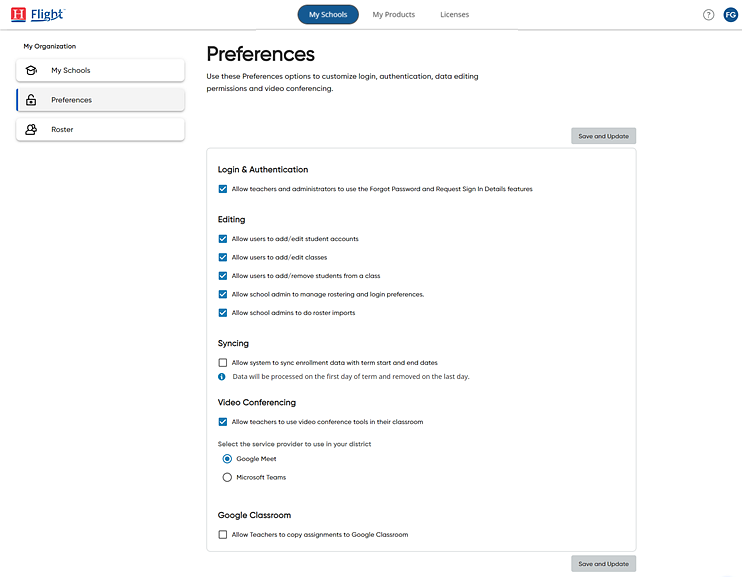
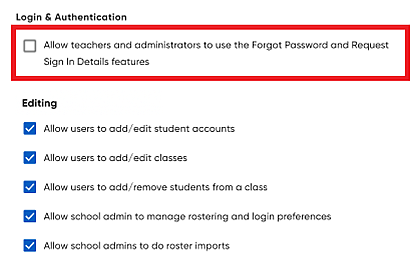
– By default, this setting is turned on because that allows your administrators and teachers to request their sign in details, set personalized passwords for the utmost level of security, and reset passwords when necessary.
– If
you plan to use single sign on (SSO) solutions (details provided
in Rostering Service Help – SSO Considerations  ),
then you will want to turn this setting off and provide your users
with their SSO endpoint and login path instead; that way, your
users are not sent an email related to platform-specific password
reset. If you plan to use Google SSO, see Rostering
Service Help –
Set Up Google SSO Connections
for details.
),
then you will want to turn this setting off and provide your users
with their SSO endpoint and login path instead; that way, your
users are not sent an email related to platform-specific password
reset. If you plan to use Google SSO, see Rostering
Service Help –
Set Up Google SSO Connections
for details.
– Administrators imported using Flight Rostering Service can be set up without rostering rights, which restricts their access to rostering functions, such as adding and editing user accounts and classes and managing preferences. If you do not see these options in Flight and require this access, you must consult with your district rostering administrator for assistance.