If you are a school or district administrator, you can send HMH Ed™ platform-based sign in details to selected administrators and teachers. To learn more, see details below.
Note: Do not use this option if you are using single sign on (SSO).
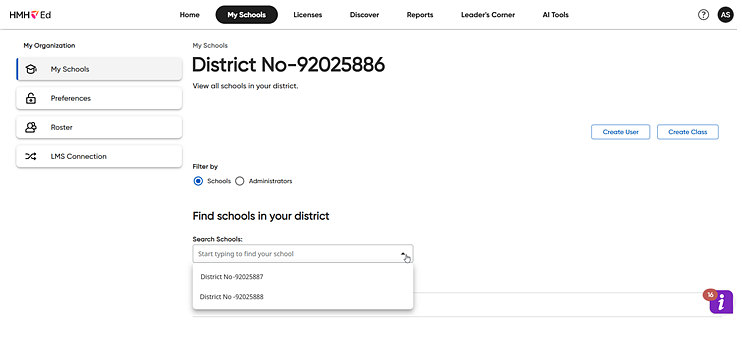
1. On the My Schools page, click the Schools option button (which is the default) and then select a school as follows.
– If you are a district administrator, select a school from the list of schools.
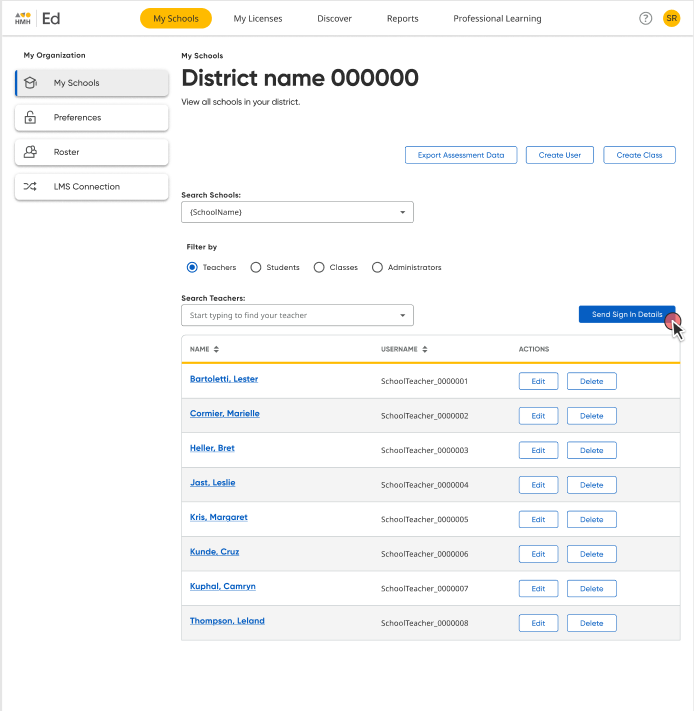
The page for the school appears and defaults to the Teachers page, which lists all of the teachers associated with the selected school.
– If you are a school administrator, the Teachers page is the first page that appears.
2. If necessary, click an option button in the Filter by area to change the user type (Teachers or Administrators). The page lists all the teachers or administrators for the selected school.
Note: The Send Sign In Details option is not available for students.
3. Click the Send Sign In Details button.
A Send Sign In Details to Teachers/Administrators dialog box appears.
4. In the Search Teachers/Administrators list, type all or part of the username(s) to locate and select users.

As you select users, they are added to the list in the dialog box. You can remove selected users by clicking the Remove button.
5. When all of the desired users are selected, click the Send Sign In Details button.

Each selected user is sent a "Sign In Details" email containing the login credentials and instructions needed to gain system access.
If you prefer, you can direct users to request their sign in credentials themselves using a link on the Ed Sign In page.
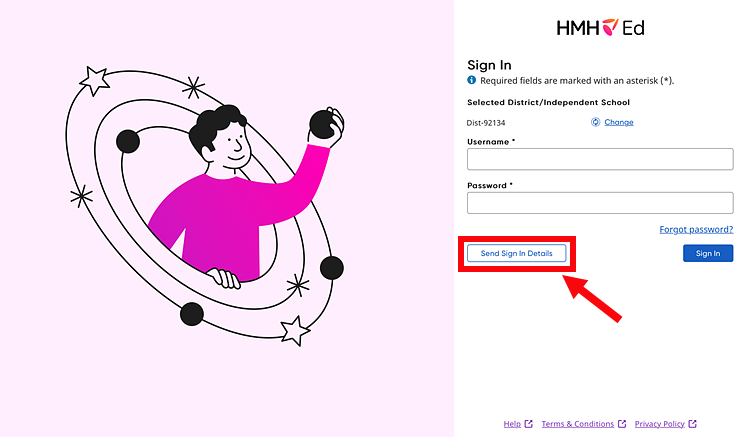
Anytime you add users who need system access, be sure you to have a plan in place to send this email or a standard email telling them to visit the Sign In page and click the Send Sign in Details button to gain site access.
See Also: