Backup & Recovery Status Notifications
In addition to the Dashboard based Backup & Recovery Checks and Reports, we have included the option to send a daily or weekly backup status email for specific devices. Configured through the device’s Backup Manager, these notification provides an at a glance view of its backup status and can be sent to any specified recipients, including end customers.
Open the Backup Manager, either on the device itself or from the Dashboard
Device
- Log on to the device
- Click the Backup Manger icon on the desktop (where available)
or
- Go to Start
- All Programs
- Backup & Recovery Backup Manager
Dashboard
- Right-click on the target device in the north panel of the Dashboard (or from the Server or Workstation drop-down)
- Backup & Recovery
- Open Backup Manager
Configure Notifications
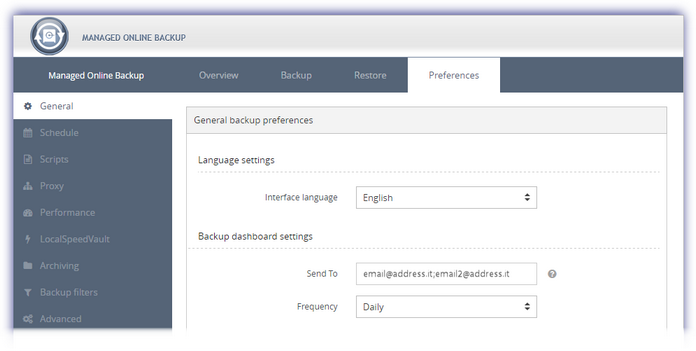
- Navigate to Preferences in the Backup Manager
- Go to General
- General Backup Preferences (where enabling archiving)
- Under Backup dashboard settings:
- Enter one or more email addresses (use semi-colons for multiple addresses)
- Select your frequency: daily, selected days or choose one specific day to receive the notification weekly
- Save to apply
Note: language used in the email is based on the Language Settings in the General backup preferences dialog.
Please note that the option to configure status notifications is not available for workstations or laptops using Backup & Recovery Documents.
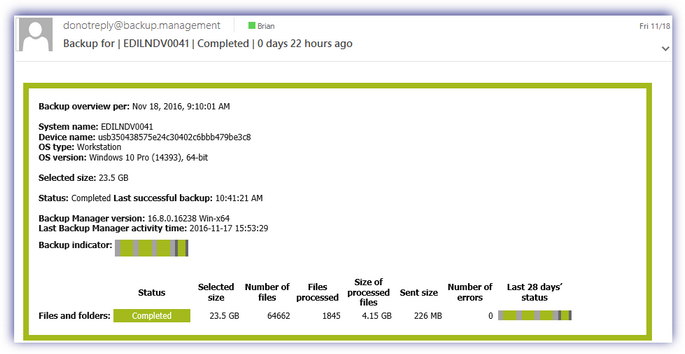
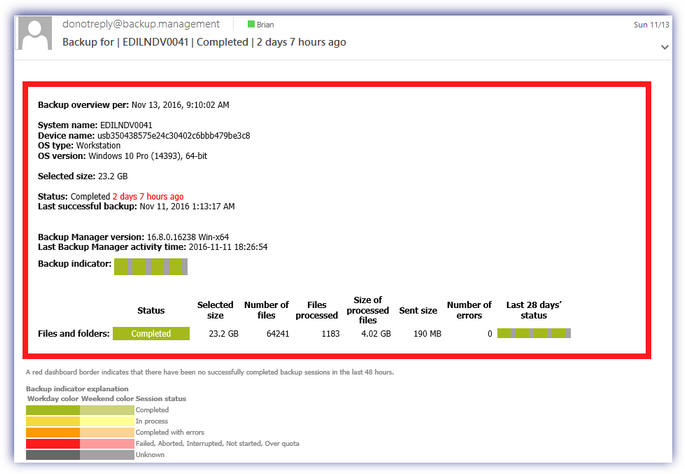
Once configured, the recipients will receive the Backup Status email between 08:00 and 12:00 on the selected days. This notification provides a detailed overview including the selected size, the date of the last successful backup and its status, as well as the status of the Local Speed Vault and the Remote Server (where enabled for that device).
To ensure the overall status may be checked at a glance, we have used the following color coding:
|
Color |
Notes |
|
Green |
Completed successfully |
|
Yellow |
In progress |
|
Amber |
Completed with errors |
|
Red |
Failed, Aborted, Interrupted, Not started, Over quota |
|
Grey |
Unknown |
Notification From Email Address
Please be aware that the notification email will come Fromdonotreply@backup.management.
To avoid any potential spam filtering issues and to ensure these notifications are successfully received would suggest whitelisting this domain.
|
Example Success Notification |
Example Failure Notification |
|
|
|