Managing DS-Client activities
The DS-Client provides tools that allow an administrator or backup operator to perform various administrative tasks, including monitoring activities in real time.
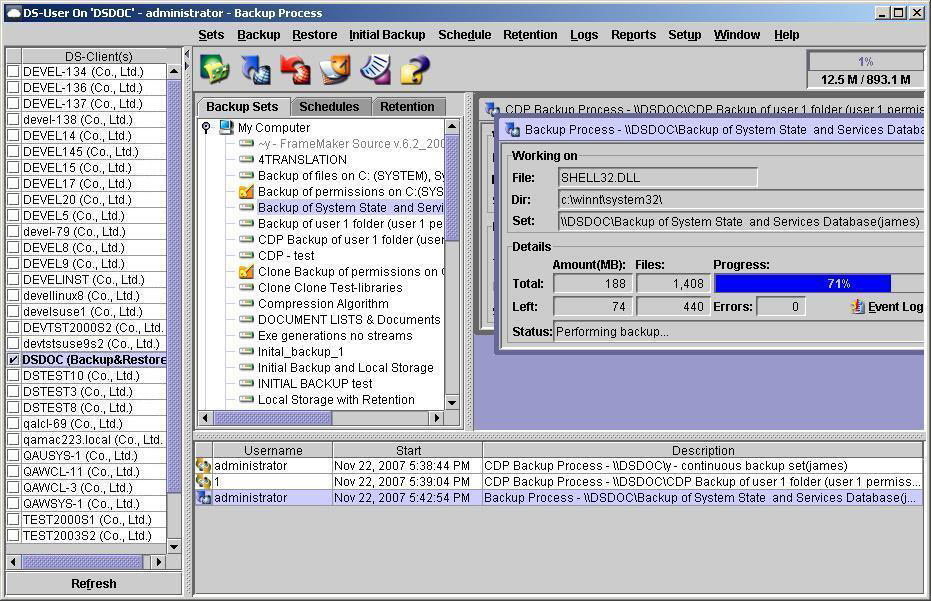
• Real-time activity monitor – This window is located in the lower section of the DS-User main window and cannot be hidden. It lists activities that are currently in progress and displays the user who authorized the activity, the time at which the activity started, the type of activity, and the name of the backup on which the activity is being performed.
• Process window – This window displays the type of process and the name of the backup for which the process is being performed. If you have started an activity on demand, the process window automatically appears.
NOTE: The process window allows you to access the Event Log to view events related to the current process. Most processes are multi-threaded and might finish before the process window can refresh.
To open the process window of an activity listed in the real-time activity monitor, double-click the activity or right-click the activity, and then click Monitor.
While an activity is in progress, you can stop the activity in one of two ways:
• In the real-time activity monitor, right-click the activity, and click Stop Activity.
• In the process window of the activity, click Stop.