The Failover Operation
Following a disaster, use the Failover operation to recover protected virtual machines to the recovery site. A failover assumes that connectivity between the sites might be down, and thus the protected virtual machines and disks are not removed, as they are in a planned Move operation.
When you set up a failover you always specify a checkpoint to which you want to recover the virtual machines. When you select a checkpoint – either the last automatically generated checkpoint, an earlier checkpoint, or a tagged checkpoint – Zerto makes sure that virtual machines at the remote site are recovered to this specified point-in-time. For details, see Managing Failover.
| Note: | To identify the checkpoint to use, you can perform a number of test failovers, each to a different checkpoint. |
Failback after the Original Site is Operational
After completing a failover, when the original site is back up and running you can move the recovered virtual machines back again using the Move operation.
The following diagram shows the positioning of the virtual machines before and after the completion of a Failover operation.
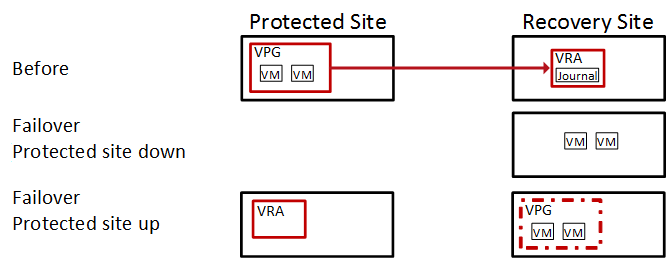
| Note: | The Failover operation leaves the VPG in a Recovered state. |
See also:
| • | The Failover Test Operation |
| • | The Move Operation |
| • | The Restore File Operation |