Replacing the SSL Certificate
The communication between the Zerto Virtual Manager and the user interface uses HTTPS.
On the first log in to the Zerto User Interface you must install a security certificate in order to be able to continue working without each login requiring acceptance of the security.
To replace the SSL certificate, perform the procedure described in To reconfigure the Zerto Virtual Manager: and select a new SSL certificate when the dialog for Zerto Virtual Manager setup is displayed:
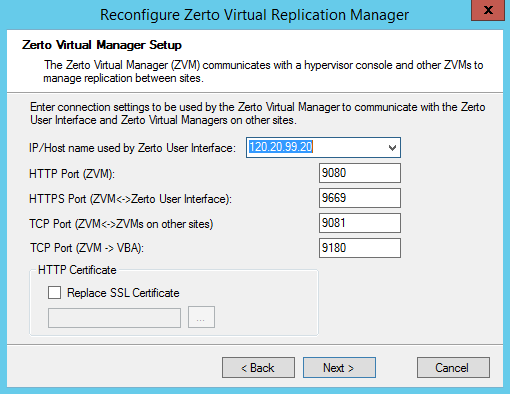
HTTP Certificate: Check Replace SSL Certificate and browse for a replacement certificate.
See also:
| • | Check Connectivity Between Zerto Components |
| • | Reconfiguring the Zerto Virtual Manager Setup |
| • | Reconfiguring the Microsoft SQL Server Database Used by the Zerto Virtual Manager |
| • | Pair to Another Site and Unpairing Sites |