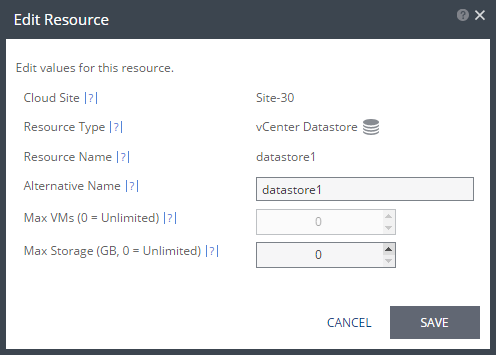
Edit Resource Dialog
This dialog is specific for the type of resource selected to be edited. For example, editing a datastore enables changing the name of the datastore that is displayed to the customer and specifying the maximum amount of storage that can be recovered with this datastore. Editing a network enables changing the network name that is displayed to the customer. Editing a resource pool enables changing the resource pool name that is displayed to the customer and specifying the maximum number of virtual machines that can be protected to the resource pool.
■ Cloud Site: The name of the cloud site that owns the resource.
■ For a vCenter cloud resource:
■ Resource Type: The type of resource: Datastore, Network, or Resource Pool.
■ Resource Name: The cloud name for the resource.
■ Alternative Name: The name the organization sees for the resource.
■ For a vCD cloud resource:
■ vCD Organization: The vCD organization name.
■ Org vDC: The organization vDC.
■ Max VMs: The maximum number of virtual machines that can be protected for the ZORG.
■ Max Storage: The maximum amount of storage that can be protected for the ZORG.