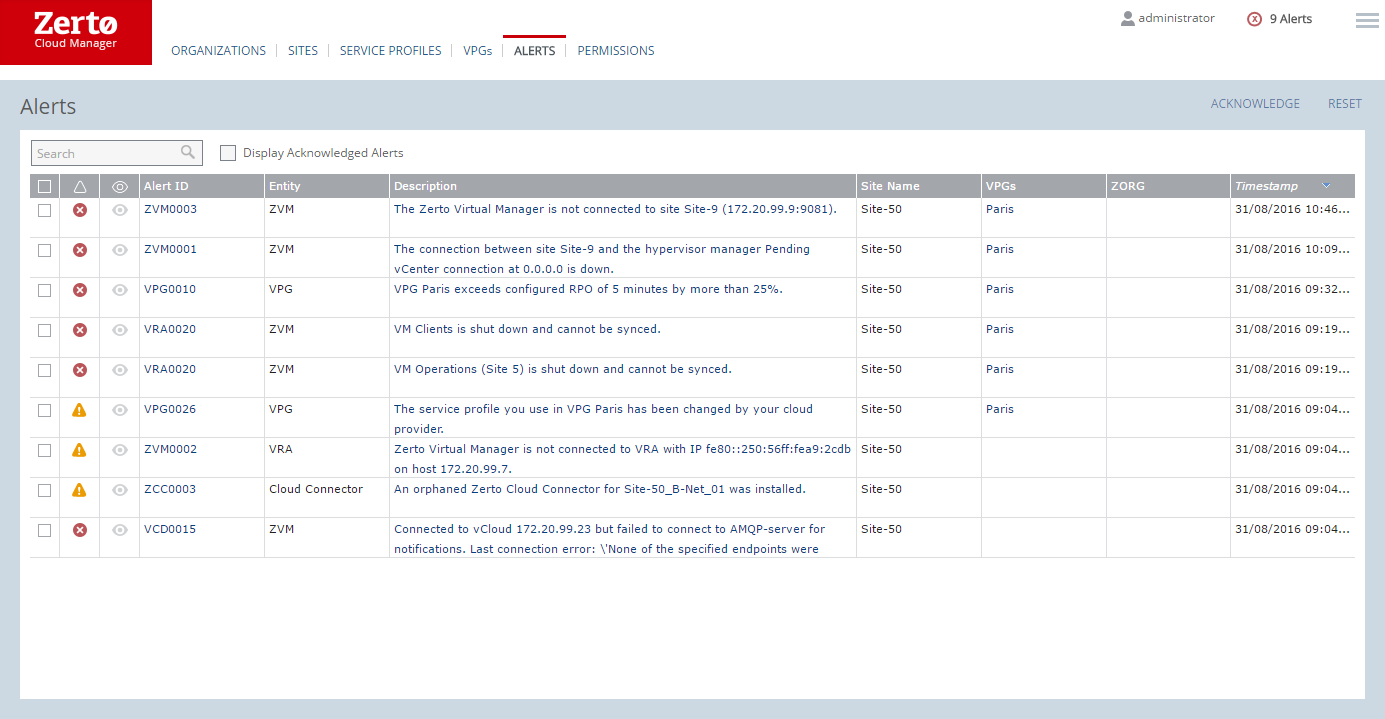
Alerts Tab
Each Zerto alert is associated with an event. These events can trigger vCenter Server alarms. Thus, when a Zerto alert is fired, a corresponding event is also fired. This event can trigger a vCenter Server alarm.
■ Acknowledge button: Dismiss selected alerts.
■ Reset button: Undismiss selected alerts that were previously dismissed.
The following information is displayed for each alert:
■ Alert status indicator: The color indicates the alert status:
■ Orange: A warning alert.
■ Red: An error alert.
■ Dismissed: Whether the alert has been dismissed or not.
■ Alert ID: The alert identifier, which can be clicked to provide more details.
■ Entity: The type of alert.
■ Site Name: The site where the alert occurred.
■ VPGs: The name of any VPGs affected by the alert.
■ ZORGs: The Zerto organizations affected by the alert.
■ Timestamp: The date and time of the alert.
■ Description: A description of the alert.