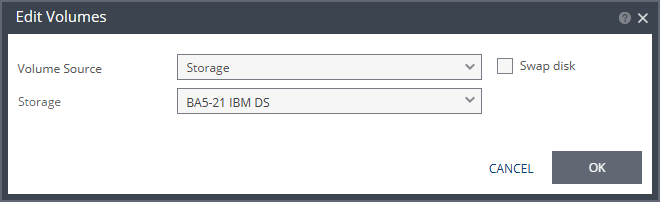
Edit Volumes Dialog
To edit recovery storage information for a protected virtual machine.
Volume Source: The source on the recovery site for the replicated data.
Storage: A new volume is used for replicated data.
Preseed: Whether to copy the protected data to a virtual disk in the recovery site. Zerto recommends using this option particularly for large disks so that the initial synchronization will be faster since a Delta Sync can be used to synchronize any changes written to the recovery site after the creation of the preseeded disk. When not using a preseeded disk, the initial synchronization phase must copy the whole disk over the WAN. When using a preseeded virtual disk, you select the storage and exact location, folder, and name of the preseeded disk. Zerto Virtual Replication takes ownership of the preseeded disk, moving it from its source folder to the folder used by the VRA. Only disks with the same size as the protected disk can be selected when browsing for a preseeded disk. The storage where the preseeded disk is placed is also used as the recovery storage for the replicated data.
Temp Data disk: If the virtual machine to be replicated includes a temp data disk as part of its configuration, specify a mirror disk for replication that is marked as a temp data disk. In this case, data is not replicated to the temp data disk after initial synchronization.
Storage: The storage to use to create disks for the replicated data.
The storage specified for the replication must have at least the same amount of space as the protected volume and then an additional amount for the journal. The amount of additional space needed for the journal can be fixed by specifying a maximum size for the journal, or can be calculated as the average change rate for the virtual machines in the VPG, multiplied by the length of time specified for the journal history.