About Zerto Virtual Replication
You can see details about the version of Zerto Virtual Replication being run and specify whether the version can be automatically updated when new VMware vSphere versions are released, without the need to upgrade to a later version of Zerto Virtual Replication. This functionality is the Zerto CALLHOME feature. You can also enable or disable the Zerto Virtual Manager to send data to the SaaS platform for monitoring purposes.
In the About window, you can do the following:
■ View the version of Zerto Virtual Replication being run.
■ Enable or disable the Zerto CALLHOME feature. The Zerto CALLHOME feature enables support notification and analytics for the following purposes:
■ To improve Zerto Virtual Replication.
■ To send notifications to the user when a new Zerto Virtual Replication version is available, or when new hypervisor versions are supported by Zerto.
■ Enable or disable Zerto Virtual Manager to send data to the SaaS platform for monitoring purposes, using the Zerto Mobile App. This action is done by licensed Zerto Virtual Manager users.
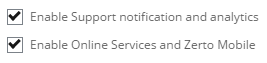
In Microsoft Hyper-V and VMware vSphere, the following options appear:
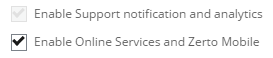
In Microsoft Azure and AWS, the following options appear:
To perform these actions, do the following:
1. In the Zerto User Interface, in the top right of the header, click
SETTING (

), and then click
About.
The version and build of Zerto Virtual Replication installed in the site are displayed.
2. To enable the Zerto CALLHOME feature, click Enable Support notification and analytics. This is selected by default.
Note: This option is grayed out for Microsoft Azure and AWS.
If the user deselects Enable Support notification and analytics, a warning appears notifying the user that deselecting this option will stop Zerto Virtual Replication from sending notifications when new Zerto Virtual Replication updates are available, or when new hosts are supported.
3. If you want Zerto Virtual Replication to send information to our Online Services and Zerto Mobile App, select Enable Online Services and Zerto Mobile. This is selected by default.
This allows licensed Zerto Virtual Manager users to enable or disable data being sent from the Zerto Virtual Manager to the SaaS platform, thereby enabling site monitoring using the Zerto Mobile App.
■ If the user deselects Enable Online Services and Zerto Mobile, a warning appears notifying the user that deselecting this option will stop Zerto Virtual Replication from sending information to Online Services and to the Zerto Mobile Application, rendering these services inoperable for the entire installation.