Ref. # | Port | Purpose |
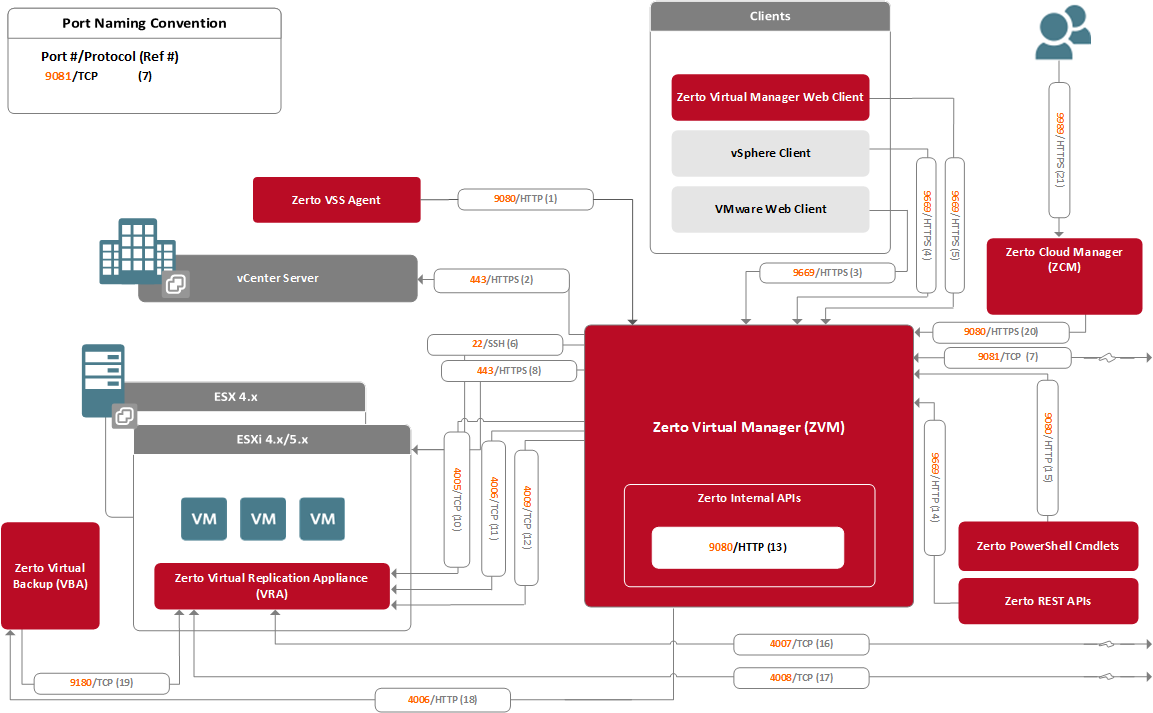
1, 13, 15, 20 | 9080 | Communication between the Zerto Virtual Manager and Zerto internal APIs, Zerto cmdlets, Zerto VSS Agents and the Zerto Cloud Manager. This is the default port which is provided during the Zerto Virtual Replication installation, and which can be changed during the installation. |
2 | 443 | Required between the Zerto Virtual Manager and the vCenter Server. |
3, 4, 5, 14 | 9669 | Communication between a machine running the Zerto User Interface, vSphere Web Client or Client console and the Zerto Virtual Manager for the relevant vCenter Server and between the Zerto Virtual Manager and Zerto REST APIs. This is the default port which is provided during the Zerto Virtual Replication installation, and which can be changed during the installation. |
6 | 22 | Required between an ESXi host and the Zerto Virtual Manager during installation of a Virtual Replication Appliance (VRA). |
7 | 9081 | Communication between paired Zerto Virtual Managers. This is the default port which is provided during the Zerto Virtual Replication installation, and which can be changed during the installation. When the same vCenter Server is used for both the protected and recovery sites, Zerto Virtual Replication is installed on one site only and this port can be ignored. |
8 | 443 | Required between an ESXi hosts and the Zerto Virtual Manager during installation of a VRA. |
10 | 4005 | Log collection between the Zerto Virtual Manager and site VRAs. |
11, 18 | 4006 | Communication between the Zerto Virtual Manager and site VRAs and the site Virtual Backup Appliance. |
12 | 4009 | Communication between the Zerto Virtual Manager and site VRAs to handle checkpoints. |
16 | 4007 | Control communication between protecting and recovering VRAs. |
17 | 4008 | Communication between VRAs to pass data from protected virtual machines to a VRA on a recovery site. |
19 | 9180 | Communication between the Virtual Backup Appliance and VRA. This is the default port which is provided during the Zerto Virtual Replication installation, and which can be changed during the installation. |
21 | 9989 | HTTPS communication between the browser and the Zerto Cloud Manager. |