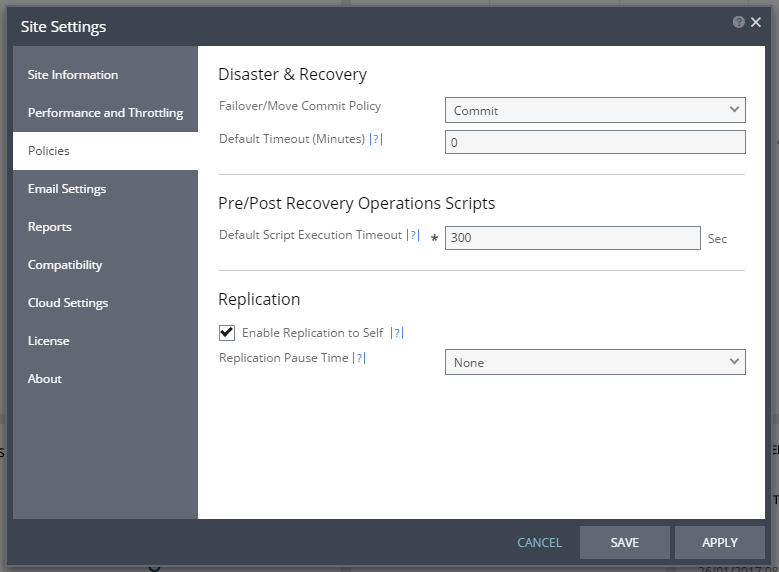
Policies Dialog
Failover/Move Commit Policy – The commit policy to use during a failover or move operation. The value set here is the default for all failover or move operations from this point on but can be changed when defining a failover or move operation. The following options are available:
■ None – The failover or move operation must be manually committed or rolled back by the user.
■ Commit – After the time specified in the Default Timeout field, the failover or move operation is committed. During the specified time you can check the recovered VPG virtual machines, and you can manually commit or roll back.
■ Rollback – After the time specified in the Default Timeout field the failover or move operation is rolled back, unless you manually commit it or roll it back before the time out value is reached. During the specified time you can check the recovered VPG virtual machines.
Default Timeout – The time-out in minutes after which a Commit or Rollback is performed. A value of zero indicates that the system automatically performs the commit policy, without waiting for any user interaction.
Default Script Execution Timeout – The length of time in seconds after which a script times out.
Enable Replication to Self – Enable the same site to be used as both the protected and recovery site.
Replication Pause Time – The time to pause when synchronizing a VPG if continuing the synchronization will cause all the checkpoints in the journal to be removed.
Allow Zerto to always enter hosts to maintenance mode during remediation - When this is selected, if the Virtual Update Manager's Remediation task is detected, Zerto will automatically enter the host into maintenance mode. The host will exit maintenance mode when the Virtual Update Manager's Remediation task is completed.
Notes:
■ Recovery and journal volumes that reside on the host are not automatically migrated to another host in the cluster.