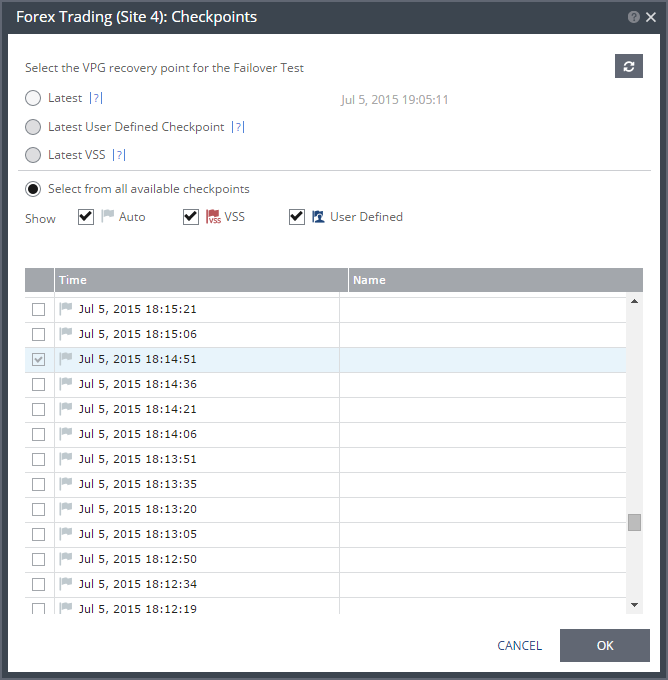
Checkpoints Dialog
The point to recover to.
Latest – The recovery or clone is to the latest checkpoint. This ensures that the data is crash-consistent for the recovery or clone. When selecting the latest checkpoint, the checkpoint used is the latest at this point. If a checkpoint is added between this point and starting the failover or clone, the later checkpoint is not used.
Latest User Defined Checkpoint – The recovery operation is to the latest checkpoint provided manually. Checkpoints added to the virtual machine journals in the VPG by the Zerto Virtual Manager ensure that the data is crash-consistent to this point. If a checkpoint is added between this point and starting the operation, this later checkpoint is not used.
Latest VSS – When VSS is used, recovery or clone is to the latest VSS snapshot, ensuring that the data is both crash-consistent and application consistent to this point. The frequency of VSS snapshots determines how much data can be recovered.
If you do not want to use the latest checkpoint, latest user defined checkpoint, or latest VSS checkpoint, choose Select from all available checkpoints. By default, this option displays all checkpoints in the system. You can choose to display only automatic, VSS, or user defined checkpoints, or any combination of these types.