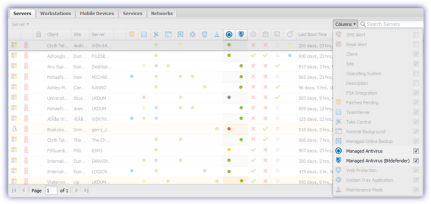
Display devices running Managed Antivirus on the Dashboard
Where configured from the Columns drop-down. The Dashboard north pane contains a visual indicator of the Managed Antivirus installation state in the  Bitdefender or
  VIPRE columns. These dots signify: green for active, yellow for pending, red for failed, gray for not supported.
The Managed Antivirus deployment status is contained in both the Managed Antivirus Protection Report accessed from Reports > Managed Antivirus Reports and the Device Inventory Report also available from the Reports menu
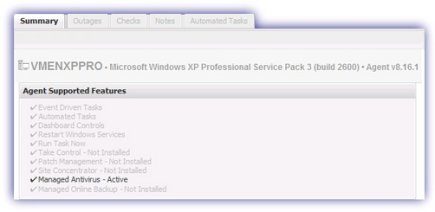
For individual devices, their Summary tab reports the installation status under Agent Supported Features.
What do you want to do?
- Review the Managed Antivirus Quick Start Guide
- View Managed Antivirus URLs
- Enable Managed Antivirus on individual servers and workstations or on all servers and workstations at a client or site
- Automatically remove installed Antivirus products
- Configure Managed Antivirus Policies. Includes scan schedules, remediation action (default threat action), end-user interaction
- Look at actions for information on the end user authorization required on macOS High Sierra (10.13) and later
- Manage Quarantined items
- Start and Cancel on-demand scans
- Remotely update Managed Antivirus Threat Definitions
- Analyze Managed Antivirus Reports, these cover the provided level of protection