Time Series Settings
Time-Series Lag-Based Recipe
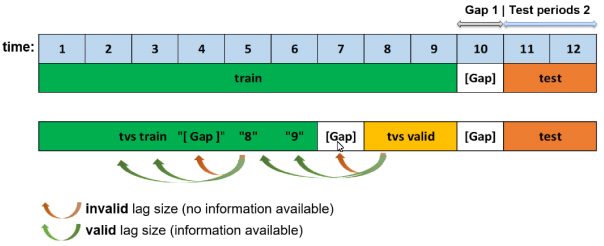
This recipe specifies whether to include Time Series lag features when training a model with a provided (or autodetected) time column. This is enabled by default. Lag features are the primary automatically generated time series features and represent a variable’s past values. At a given sample with time stamp \(t\), features at some time difference \(T\) (lag) in the past are considered. For example, if the sales today are 300, and sales of yesterday are 250, then the lag of one day for sales is 250. Lags can be created on any feature as well as on the target. Lagging variables are important in time series because knowing what happened in different time periods in the past can greatly facilitate predictions for the future. Note: Ensembling is disabled when the lag-based recipe with time columns is activated because it only supports a single final model. Ensembling is also disabled if a time column is selected or if time column is set to [Auto] on the experiment setup screen.
More information about time series lag is available in the Time Series Use Case: Sales Forecasting section.
Larger Validation Splits for Lag-Based Recipe
Specify whether to create larger validation splits that are not bound to the length of the forecast horizon. This can help to prevent overfitting on small data or short forecast horizons. This is enabled by default.
Fixed-size train timespan across splits
Specify whether to keep a fixed-size train timespan across time-based splits during internal validation. That leads to roughly the same amount of train samples in every split. This is disabled by default.
Custom Validation Splits for Time-Series Experiments
Specify date or datetime timestamps (in the same format as the time column) to use for custom training and validation splits.
Timeout in Seconds for Time-Series Properties Detection in UI
Specify the timeout in seconds for time-series properties detection in Driverless AI’s user interface. This value defaults to 30.
Generate Holiday Features
For time-series experiments, specify whether to generate holiday features for the experiment. This is enabled by default.
List of Countries for Which to Look up Holiday Calendar and to Generate Is-Holiday Features For
Specify country codes in the form of a list that is used to look up holidays.
Note: This setting is for migration purposes only.
Time-Series Lags Override
Specify the override lags to be used. These can be used to give more importance to the lags that are still considered after the override is applied. The following examples show the variety of different methods that can be used to specify override lags:
“[0]” disable lags
“[7, 14, 21]” specifies this exact list
“21” specifies every value from 1 to 21
“21:3” specifies every value from 1 to 21 in steps of 3
“5-21” specifies every value from 5 to 21
“5-21:3” specifies every value from 5 to 21 in steps of 3
Lags override for features that are not known ahead of time
Specify lags override for non-target features that are not known ahead of time.
“[0]” disable lags
“[7, 14, 21]” specifies this exact list
“21” specifies every value from 1 to 21
“21:3” specifies every value from 1 to 21 in steps of 3
“5-21” specifies every value from 5 to 21
“5-21:3” specifies every value from 5 to 21 in steps of 3
Lags override for features that are known ahead of time
Specify lags override for non-target features that are known ahead of time.
“[0]” disable lags
“[7, 14, 21]” specifies this exact list
“21” specifies every value from 1 to 21
“21:3” specifies every value from 1 to 21 in steps of 3
“5-21” specifies every value from 5 to 21
“5-21:3” specifies every value from 5 to 21 in steps of 3
Smallest Considered Lag Size
Specify a minimum considered lag size. This value defaults to -1.
Enable Feature Engineering from Time Column
Specify whether to enable feature engineering based on the selected time column, e.g. Date~weekday. This is enabled by default.
Allow Integer Time Column as Numeric Feature
Specify whether to enable feature engineering from an integer time column. Note that if you are using a time series recipe, using a time column (numeric time stamps) as an input feature can lead to a model that memorizes the actual timestamps instead of features that generalize to the future. This is disabled by default.
Allowed Date and Date-Time Transformations
Specify the date or date-time transformations to allow Driverless AI to use. Choose from the following transformers:
year
quarter
month
week
weekday
day
dayofyear
num (direct numeric value representing the floating point value of time, disabled by default)
hour
minute
second
Features in Driverless AI will appear as get_ followed by the name of the transformation. Note that get_num can lead to overfitting if used on IID problems and is disabled by default.
Auto filtering of date and date-time transformations
Whether to automatically filter out date and date-time transformations that would lead to unseen values in the future. This is enabled by default.
Consider Time Groups Columns as Standalone Features
Specify whether to consider time groups columns as standalone features. This is disabled by default.
Which TGC Feature Types to Consider as Standalone Features
Specify whether to consider time groups columns (TGC) as standalone features. If “Consider time groups columns as standalone features” is enabled, then specify which TGC feature types to consider as standalone features. Available types are numeric, categorical, ohe_categorical, datetime, date, and text. All types are selected by default. Note that “time_column” is treated separately via the “Enable Feature Engineering from Time Column” option. Also note that if “Time Series Lag-Based Recipe” is disabled, then all time group columns are allowed features.
Enable Time Unaware Transformers
Specify whether various transformers (clustering, truncated SVD) are enabled, which otherwise would be disabled for time series experiments due to the potential to overfit by leaking across time within the fit of each fold. This is set to Auto by default.
Always Group by All Time Groups Columns for Creating Lag Features
Specify whether to group by all time groups columns for creating lag features. This is enabled by default.
Generate Time-Series Holdout Predictions
Specify whether to create diagnostic holdout predictions on training data using moving windows. This is enabled by default. This can be useful for MLI, but it will slow down the experiment considerably when enabled. Note that the model itself remains unchanged when this setting is enabled.
Number of Time-Based Splits for Internal Model Validation
Specify a fixed number of time-based splits for internal model validation. Note that the actual number of allowed splits can be less than the specified value, and that the number of allowed splits is determined at the time an experiment is run. This value defaults to -1 (auto).
Maximum Overlap Between Two Time-Based Splits
Specify the maximum overlap between two time-based splits. The amount of possible splits increases with higher values. This value defaults to 0.5.
Maximum Number of Splits Used for Creating Final Time-Series Model’s Holdout Predictions
Specify the maximum number of splits used for creating the final time-series Model’s holdout predictions. The default value (-1) will use the same number of splits that are used during model validation.
Whether to Speed up Calculation of Time-Series Holdout Predictions
Specify whether to speed up time-series holdout predictions for back-testing on training data. This setting is used for MLI and calculating metrics. Note that predictions can be slightly less accurate when this setting is enabled. This is disabled by default.
Whether to Speed up Calculation of Shapley Values for Time-Series Holdout Predictions
Specify whether to speed up Shapley values for time-series holdout predictions for back-testing on training data. This setting is used for MLI. Note that predictions can be slightly less accurate when this setting is enabled. This is enabled by default.
Generate Shapley Values for Time-Series Holdout Predictions at the Time of Experiment
Specify whether to enable the creation of Shapley values for holdout predictions on training data using moving windows at the time of the experiment. This can be useful for MLI, but it can slow down the experiment when enabled. If this setting is disabled, MLI will generate Shapley values on demand. This is enabled by default.
Lower Limit on Interpretability Setting for Time-Series Experiments (Implicitly Enforced)
Specify the lower limit on interpretability setting for time-series experiments. Values of 5 (default) or more can improve generalization by more aggressively dropping the least important features. To disable this setting, set this value to 1.
Dropout Mode for Lag Features
Specify the dropout mode for lag features in order to achieve an equal n.a. ratio between train and validation/tests. Independent mode performs a simple feature-wise dropout. Dependent mode takes the lag-size dependencies per sample/row into account. Dependent is enabled by default.
Probability to Create Non-Target Lag Features
Lags can be created on any feature as well as on the target. Specify a probability value for creating non-target lag features. This value defaults to 0.1.
Method to Create Rolling Test Set Predictions
Specify the method used to create rolling test set predictions. Choose between test time augmentation (TTA) and a successive refitting of the final pipeline. TTA is enabled by default. Note that refitting only applies to scoring of a provided test set at the end of an experiment. The final scoring pipeline will always use TTA.
Fast TTA for GA Validation
Specify whether the genetic algorithm applies Test Time Augmentation (TTA) in one pass instead of using rolling windows for validation splits longer than the forecast horizon. This is enabled by default.
Probability for New Time-Series Transformers to Use Default Lags
Specify the probability for new lags or the EWMA gene to use default lags. This is determined independently of the data by frequency, gap, and horizon. This value defaults to 0.2.
Probability of Exploring Interaction-Based Lag Transformers
Specify the unnormalized probability of choosing other lag time-series transformers based on interactions. This value defaults to 0.2.
Probability of Exploring Aggregation-Based Lag Transformers
Specify the unnormalized probability of choosing other lag time-series transformers based on aggregations. This value defaults to 0.2.
Time Series Centering or Detrending Transformation
Specify whether to use centering or detrending transformation for time series experiments. Select from the following:
None (Default)
Centering (Fast)
Centering (Robust)
Linear (Fast)
Linear (Robust)
Logistic
Epidemic (Uses the SEIRD model)
The trend is removed from the target signal once the free parameters of the trend model are fitted. Predictions are made by adding the previously removed trend once the pipeline is fitted on the residuals.
Notes:
MOJO support is currently disabled when this setting is enabled.
The Robust centering and linear detrending options use random sample consensus (RANSAC) to achieve higher tolerance w.r.t. outliers.
Custom Bounds for SEIRD Epidemic Model Parameters
Specify the custom bounds for controlling Susceptible-Infected-Exposed-Recovered-Dead (SEIRD) epidemic model parameters for detrending of the target for each time series group. The target column must correspond to I(t), which represents infection cases as a function of time.
For each training split and time series group, the SEIRD model is fit to the target signal by optimizing a set of free parameters for each time series group. The model’s value is then subtracted from the training response, and the residuals are passed to the feature engineering and modeling pipeline. For predictions, the SEIRD model’s value is added to the residual predictions from the pipeline for each time series group.
The following is a list of free parameters:
N: Total population, N = S+E+I+R+D
beta: Rate of exposure (S -> E)
gamma: Rate of recovering (I -> R)
delta: Incubation period
alpha: Fatality rate
rho: Rate at which individuals expire
lockdown: Day of lockdown (-1 => no lockdown)
beta_decay: Beta decay due to lockdown
beta_decay_rate: Speed of beta decay
Provide upper or lower bounds for each parameter you want to control. The following is a list of valid parameters:
N_minN_maxbeta_minbeta_maxgamma_mingamma_maxdelta_mindelta_maxalpha_minalpha_maxrho_minrho_maxlockdown_minlockdown_maxbeta_decay_minbeta_decay_maxbeta_decay_rate_minbeta_decay_rate_max
You can change any subset of parameters. For example:
ts_target_trafo_epidemic_params_dict="{'N_min': 1000, 'beta_max': 0.2}"
Refer to https://en.wikipedia.org/wiki/Compartmental_models_in_epidemiology and https://arxiv.org/abs/1411.3435 for more information on the SEIRD model.
Note: In cases where death rates are very low, the SEIR model can speed up calculations significantly. To get the SEIR model, set alpha_min=alpha_max=rho_min=rho_max=beta_decay_rate_min=beta_decay_rate_max=0 and lockdown_min=lockdown_max=-1.
Which SEIRD Model Component the Target Column Corresponds To
Specify a SEIRD model component for the target column to correspond to. Select from the following:
I (Default): Infected
R: Recovered
D: Deceased
Time Series Lag-Based Target Transformation
Specify whether to use either the difference between or ratio of the current target and a lagged target. Select from None (default), Difference, and Ratio.
Notes:
MOJO support is currently disabled when this setting is enabled.
The corresponding lag size is specified with the Lag Size Used for Time Series Target Transformation expert setting.
Lag Size Used for Time Series Target Transformation
Specify the lag size used for time series target transformation. Specify this setting when using the Time Series Lag-Based Target Transformation setting. This value defaults to -1.