Custom Individual Recipe
The following sections describe Driverless AI’s Individual Recipe feature.
Understanding the Individual Recipe
In Driverless AI, every completed experiment automatically generates Python code for the experiment that corresponds to the individual(s) used to build the final model. You can edit this auto-generated Python code offline and upload it as a recipe, or edit and save it using the built-in custom recipe management editor. This feature gives you code-first access to a significant portion of DAI’s internal transformer and model generation process.
The Individual Recipe contains information about model type, model hyperparameters, data science types for input features, transformers used, and transformer parameters. It is an object that is evolved by mutation within the context of DAI’s genetic algorithm. The Individual Recipe can be used in DAI’s Expert Settings with the Include specific individuals parameter.
This feature is supported for experiments made using DAI 1.7.2 and later.
Using custom individuals
A custom individual can be run as is, evolved alongside other models or individuals, or frozen to be included as is during the final evolution stage alongside other models from the experiment.
As is: To ensemble the custom individuals as they are, set enable_genetic_algorithm to off. Note that to get reproducible results, set reproducibility to on and make sure that the same accuracy knob settings are selected (as accuracy settings affects the internal cross validation fold data assignment).
Evolve alongside other models or individuals: This is the default behavior where a custom individual behaves like a standard internal DAI individual, which has its features and model hyperparameters mutated during the genetic algorithm process as per the experiment settings.
Frozen individuals: By default, a custom individual behaves like a standard internal DAI individual, which has its features and model hyperparameters mutated during evolution. To disable the mutation of features and model hyperparameters and “freeze” a custom individual during the DAI genetic evolution process, set
self.paramsvalues (in the code):self.params = {'prob_perturb_xgb': 0, 'prob_add_genes': 0, 'prob_prune_genes': 0, 'prob_prune_by_features': 0, 'prob_addbest_genes': 0, 'prob_prune_by_features': 0}
If all individuals in an experiment are frozen, then no tuning or evolution is performed for them. You can specify the number of such individuals to be included in an ensemble along with any other, by modifying the Ensemble Level for Final Modeling Pipeline expert setting.
Getting the Individual Recipe from experiments
In Driverless AI, every experiment automatically generates editable python code for the best individuals (or models). The following sections describe how to get the Individual Recipe code for a completed experiment.
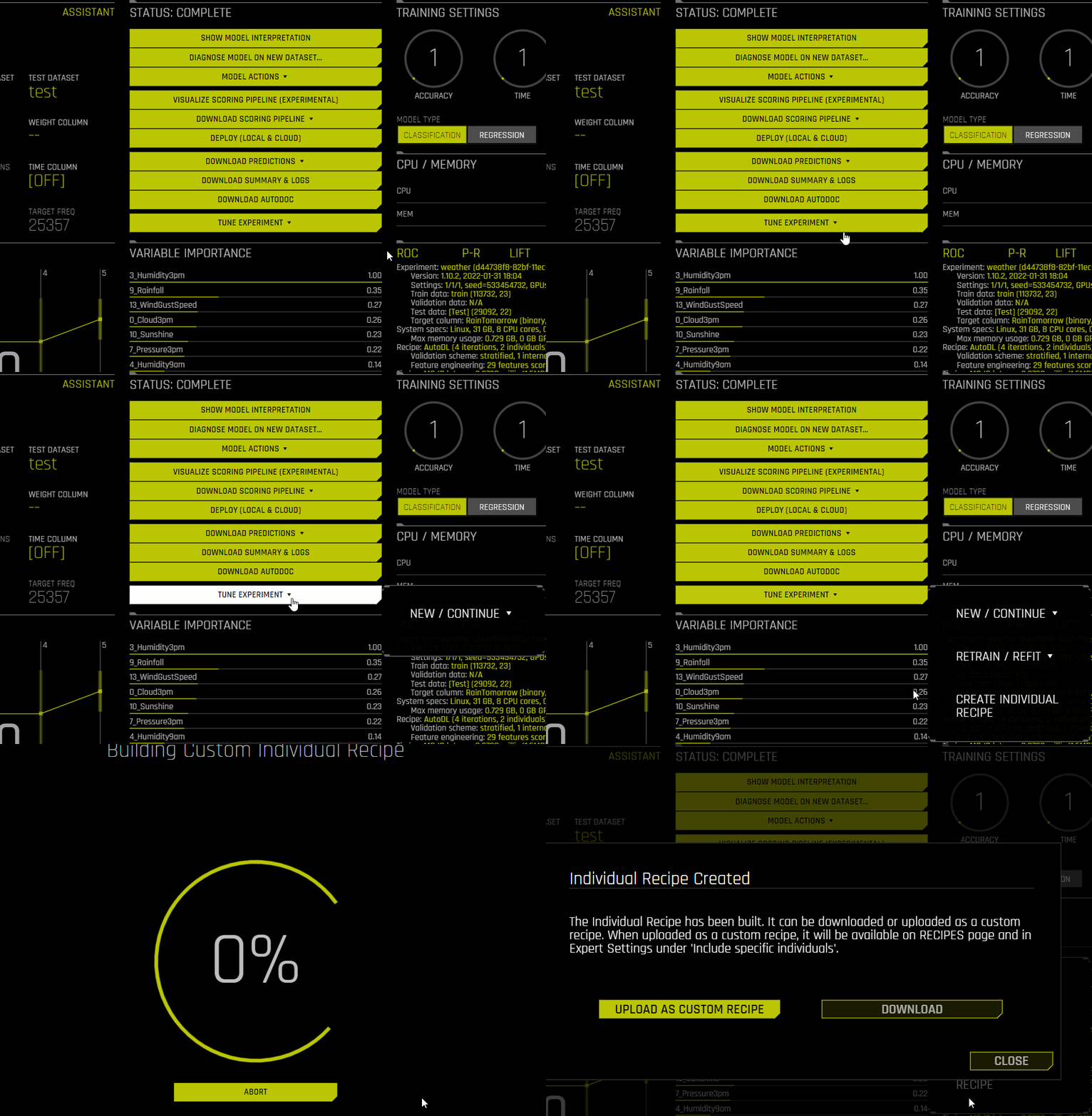
From a completed experiment : From a completed experiment page, click the Tune Experiment drop-down, then select Create Individual Recipe. Upload the Individual Recipe as a Custom Recipe. When this option is selected, the Individual Recipe becomes available on the Recipes page and in the Expert Settings under the Include specific individuals setting. Or Download the Individual Recipe Python file directly to your local file system. You can add the downloaded Individual Recipe to DAI by clicking Recipes in the main navigation, then clicking Add Custom Recipes -> From Computer.
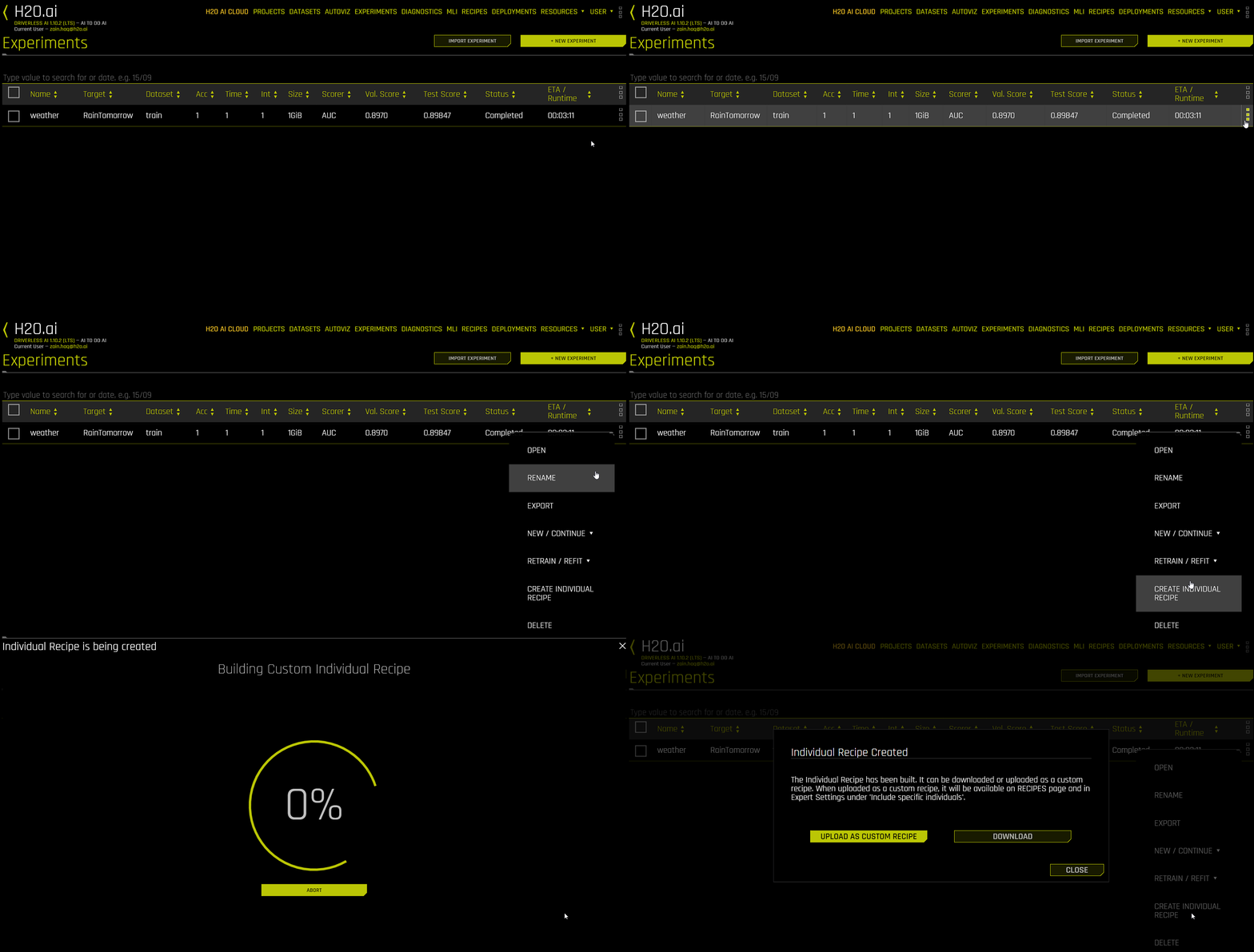
From the Experiments listing page : By clicking the drop-down button next to the experiment you want to create the Individual Recipe for select the Create Individual Recipe option.
From the Downloaded Summary : The Individual Recipe Python file is included as part of the summary file for every completed experiment. To download the summary file, click the Download Summary & Logs button of any completed experiment. The individual recipe file name follows this convention
final_indiv0.py.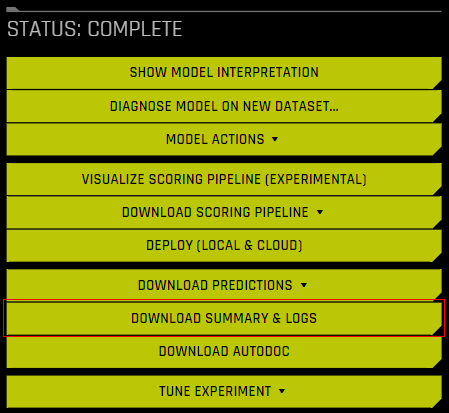
Including specific individuals in an experiment
The downloaded individual recipe (zip or .py file) can be directly uploaded from the computer via the expert settings when creating a new experiment.
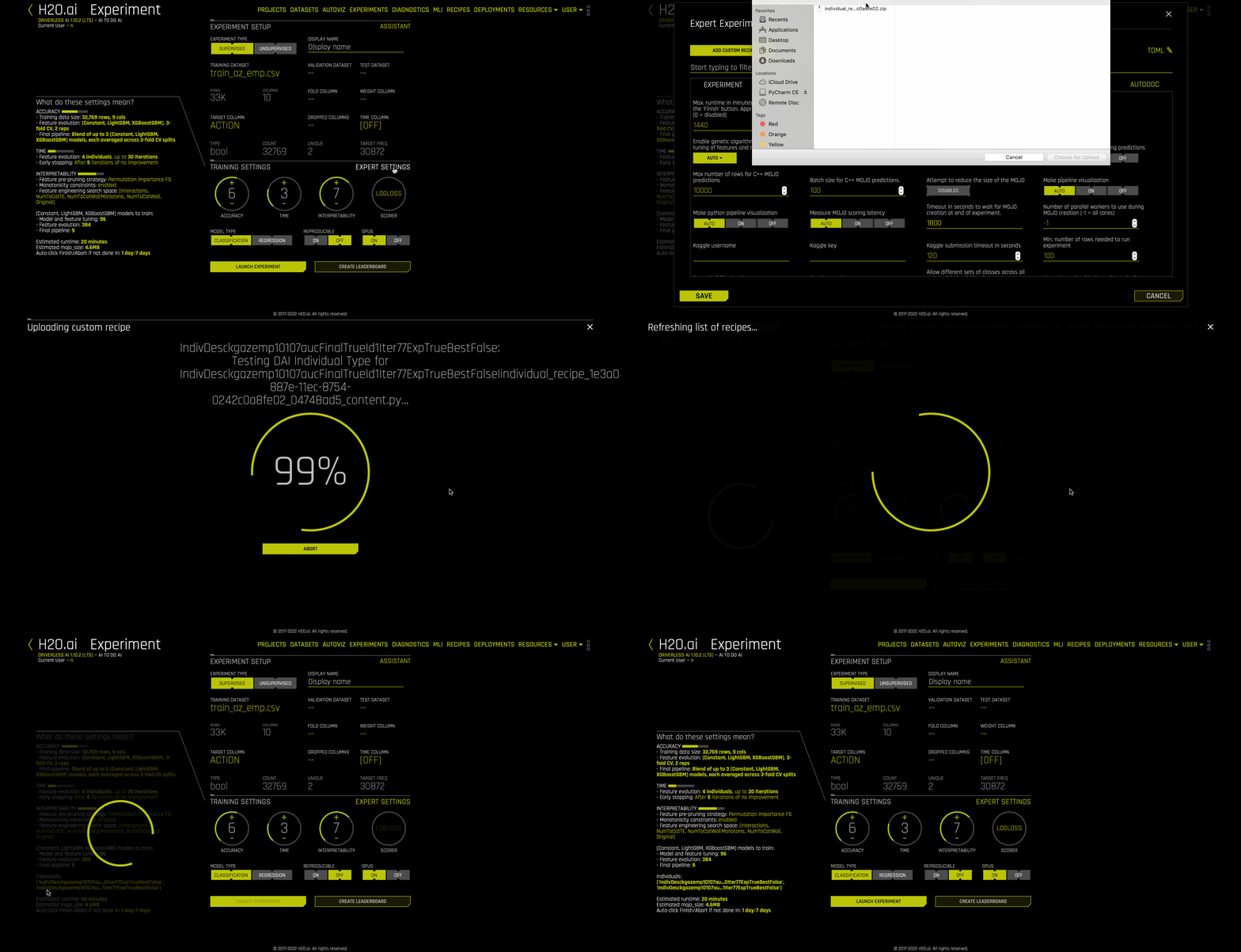
or
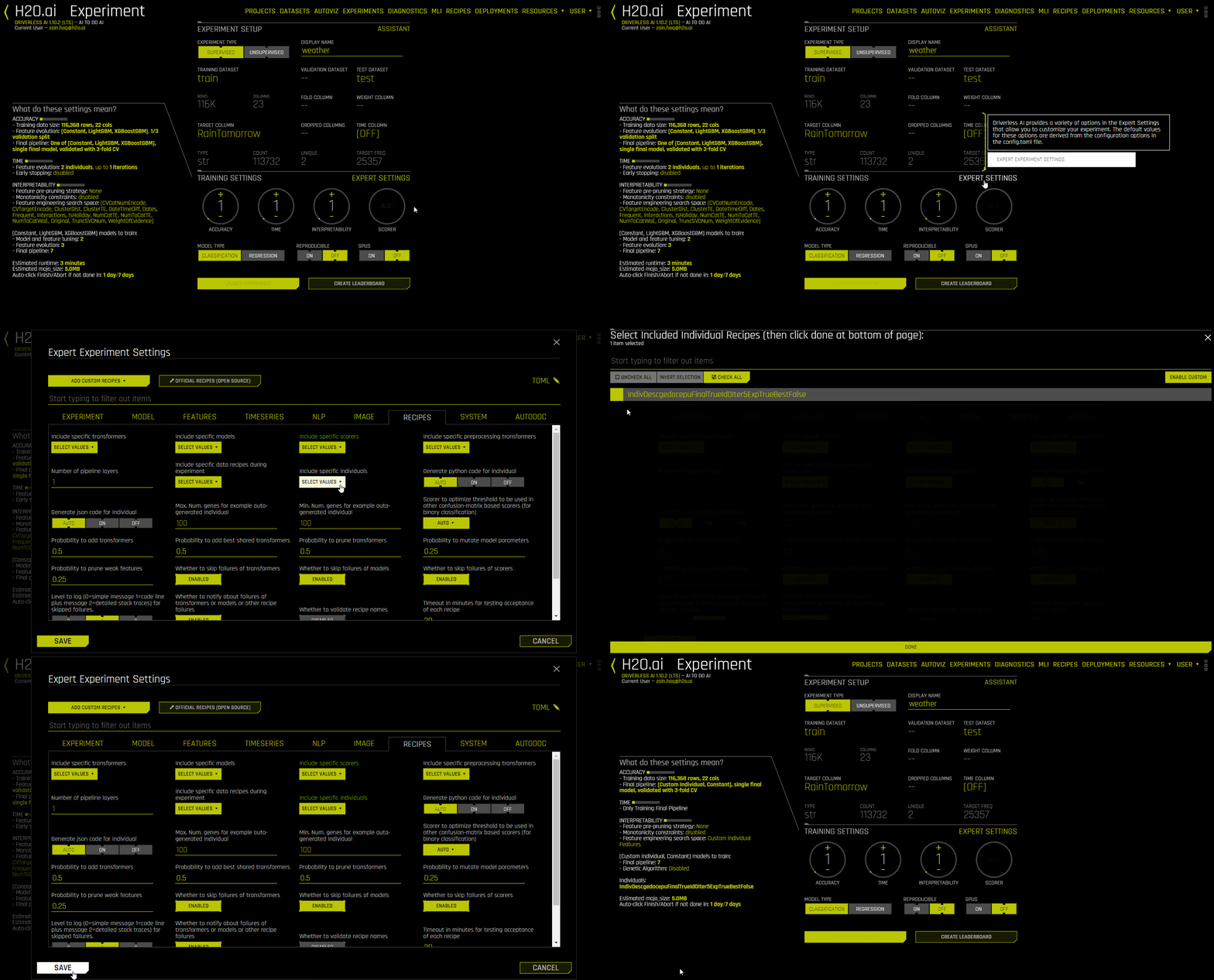
The following steps can be performed to include an already uploaded Individual recipe using Include specific individuals expert setting.
On the Experiment Setup page, click Expert Settings. The Expert Settings window is displayed.
Click the Recipes tab, then click Select Values for the Include specific individuals expert setting.
Select the custom individuals you want to include in the experiment, then click Done.
In the Expert Settings window, click Save. The experiment preview updates to reflect the inclusion of the selected custom individuals.
Individual Recipe Example
User can create their own or edit a pre-existing individual recipe. Driverless AI recipes GitHub repository lists some examples.
Minimum required parameters
The following is a list of the minimum required parameters for a custom Individual Recipe:
Model type: Specify the model type. For example:
self.model_display_name = 'LightGBM'
Model parameters: Specify the parameters of the model. For example:
self.model_params = {'eval_metric': 'auc', 'objective': 'binary'}
Genome: Specify all valid parameters for genes. For example:
def set_genes(self):
    params = {'num_cols': ['PAY_0'], 'random_state': 159699540}
    self.add_transformer('OriginalTransformer', **params)
For information on Driverless AI’s implementation of the genetic algorithm, see Genetic Algorithm in Driverless AI.
The following is an example of a custom Individual Recipe using the Credit Card dataset:
from h2oaicore.ga import CustomIndividual

# Custom wrapper class used to construct the DAI Individual.
# Contains information related to model type, model parameters,
# feature types, and feature parameters.

class IndivCCsimple(CustomIndividual):

    # Function to set the model type and its parameters.

    def set_model(self):
        self.model_display_name = 'LightGBM'
        self.model_params = {'eval_metric': 'auc', 'objective': 'binary'}

    # Function to set genes / transformers.

    def set_genes(self):
        self.add_transformer('OriginalTransformer', num_cols=['PAY_0'])
For an example Individual Recipe that features all parameters, see creditcard.py from the official Driverless AI recipes GitHub repository.